11 :
AUTOMATIC UNDERLINING
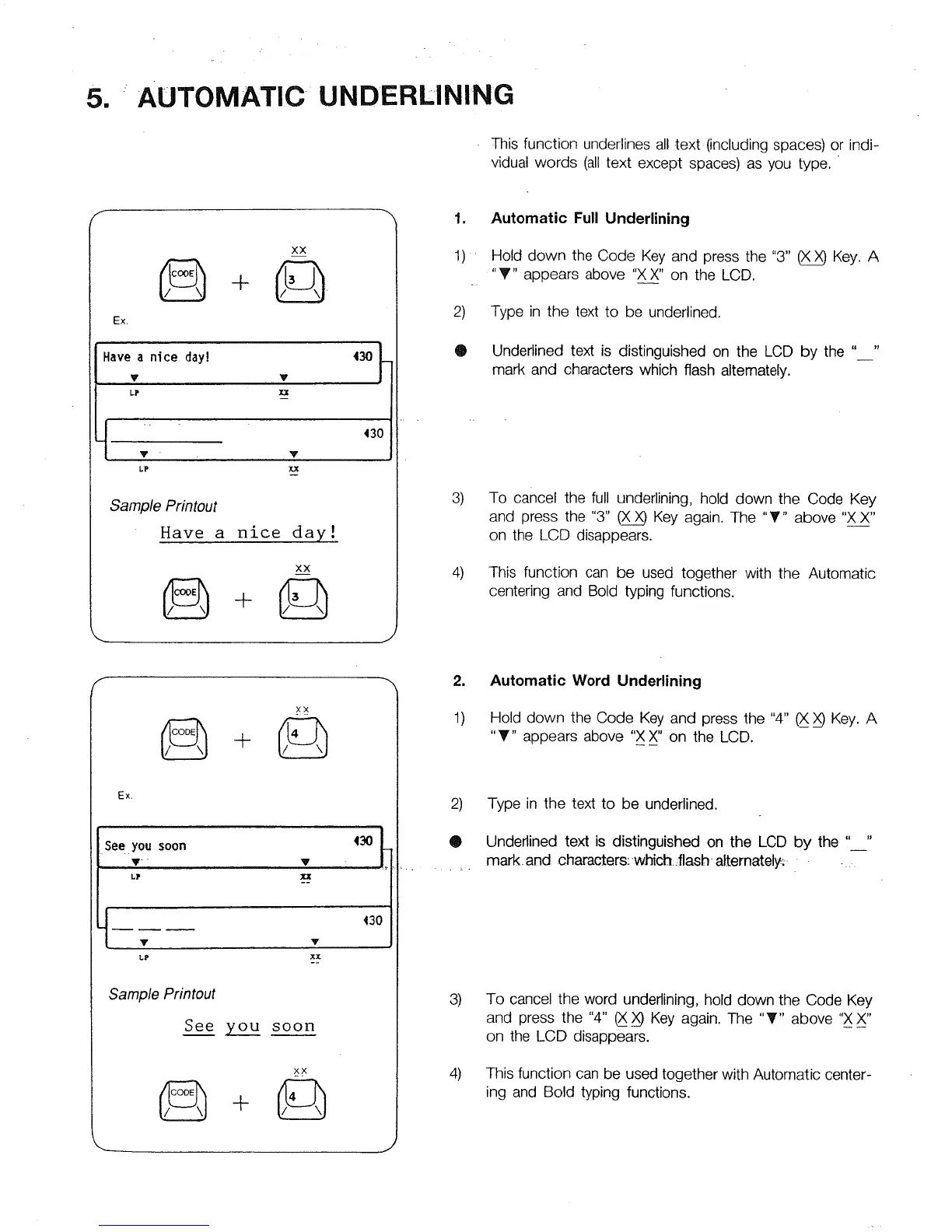
This function underlines all text (including spaces) or indi-
vidual words (all text except spaces) as you type.
f
XX
Ex.
Havea nice day! 430
v v
t "
130
Y Y
SampleP_tout
Have a nice day!
XX
1. Automatic Full Underlining
1) Hold down the Code Key and press the "3" _ Key. A
"_" appears above "XX" on the LCD.
2) Type in the text to be underlined.
• Underlined text is distinguished on the LCD by the " "
mark and characters which flash alternately.
3)
4)
To cancel the ful! underlining, hold down the Code Key
and press the "3" _ Key again. The "T" above "X X"
on the LCD disappears.
This function can be used together with the Automatic
centering and Bold typing functions.
XX
Ex.
430
See.you soon
y V
LP
130
y v
.-
Sample Printout
See you soon
xx
2)
®
2. Automatic Word Underlining
1) Hold down the Code Key and press the "4" _ Key. A
"T" appears above "X X" on the LCD.
3)
4)
Type in the text to be underlined.
Underlined text is distinguished on the LCD by the " "
mark. and characters:-whtch. _flash-alternately:.... .
To cancel the word underlining, hold down the Code Key
and press the "4" _ _ Key again. The "_" above "X X"
on the LCD disappears.
This function can be used together with Automatic center-
ing and Bold typing functions.



 To Next Page