Communications and multimedia
Multimedia
USB/A
UX
-INP
ort
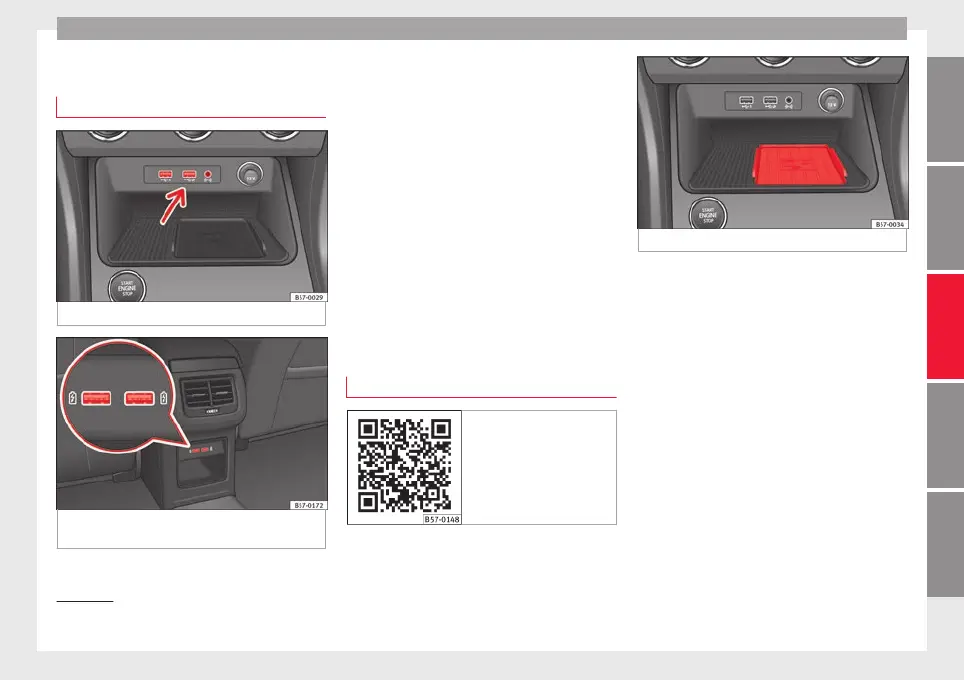
Fig. 124 Centre console: USB/AUX-IN input.
Fig. 125 Centre console, rear section: USB
c
onnect
or
s.
Depending on the special characteristics and
the c
ou
ntr
y, the vehicle may have a
USB/AUX-IN port.
The USB/AUX-IN port can be found in the
storage compartment area of the centre con-
sole ››› Fig. 124.
The operating description is located in the re-
spective Instruction Manuals of the audio
system or the navigation system.
Depending on the equipment and the coun-
try, the vehicle may also have USB connec-
tions exclusively for charging or as a power
socket.
These USB ports are located at the rear of the
console, between the front seats ››› Fig. 125.
Connectivity Box* / Wireless Charger*
Fig. 126 Related video
Fig. 127 Centre console: Connectivity Box.
Depending on the features and the country,
the
v
ehic
le may have one of these two op-
tions: Connectivity Box or Wireless Charger.
With the Connectivity Box you can charge
your mobile device wirelessly with Qi
1)
tech-
nology, while also reducing the radiation in
the vehicle and getting better reception.
With the Wireless Charger you only have the
wireless charging function if your mobile de-
vice has Qi technology.
The Connectivity Box/Wireless Charger is in
the storage compartment area of the centre
console ››› Fig. 127.
The operating description is located in the re-
spective Instruction Manuals of the audio
system or the navigation system.
»
1)
Qi technology allows you to charge your mobile
phone wirel
essly.
123
Technical dataAdviceOperationEmergenciesSafety



 To Next Page