Driver assistance systems
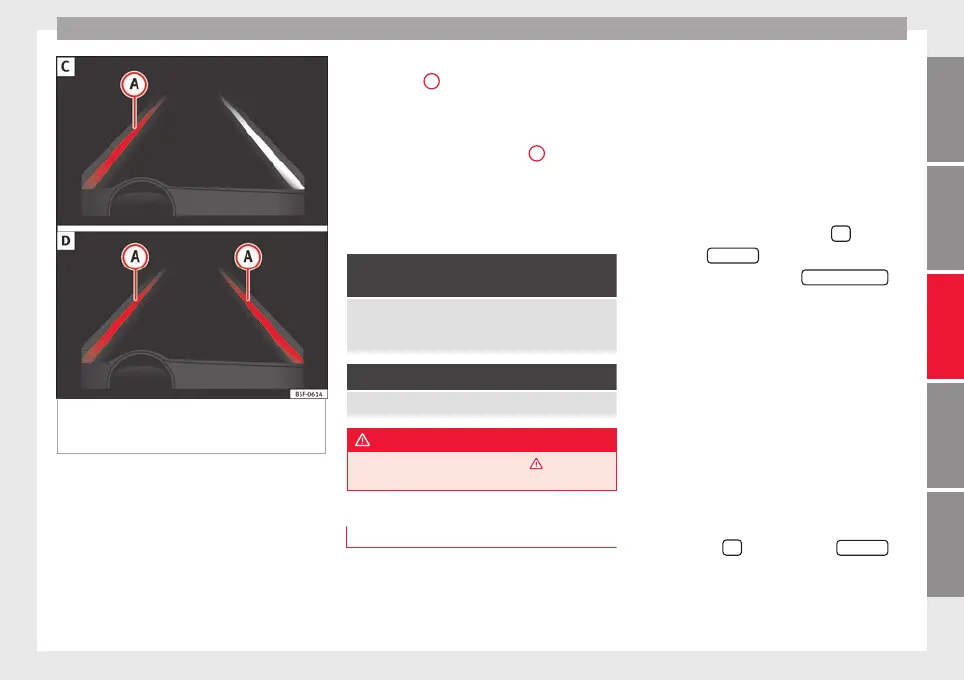
Fig. 204 On the instrument panel display: In-
dic
ation on the Lane As
s
ist system display
(example 2).
Status display
The sy
s
t
em is active, but not available,
either because the minimum speed has
not been reached or because the lane
lines are not recognised ››› Fig. 203 A.
The system is active and available, both
lane lines are recognised. The steering
angle is not being corrected at this mo-
ment ››› Fig. 203 B.
–
–
The system is operational, the highligh-
ted line
A
indicates that there was a
ri
sk
of
involuntarily crossing the lane
line and that the steering is being adjus-
ted to correct the angle ››› Fig. 204 C.
The two highlighted lines
A
light up si-
mu
lt
aneou
sly when both lane lines are
recognised and the Lane Assist function
is active ››› Fig. 204 D.
Control lamps
It lights up yellow: Lane Assist active
but not available.
The system can not accurately recognise the lane.
Please see page 232, the Lane Assist system is not
available (the control lamp is lit up yellow).
It lights up green
Lane Assist system active and available.
WARNING
Observe the safety warnings ›››
in Warning
and contro
l lamps on page 119.
Operating mode
Steering wheel vibration
The f
o
l
lowing situations can cause vibration
in the steering wheel and require the driver
to take active control of driving:
–
–
●
When the steering angle assist value re-
quired to keep the vehicle in the lane is high-
er than the system’s maximum operating val-
ue.
●
If the system ceases to display the lane
lines while assisting with steering.
Switching the Lane Assist system on or off
Through the Easy Connect system
●
Press the Easy Connect button
●
Press the
S
ET
TINGS
function button
●
Press the function button
Driv
er a
s
sistance
to
open the menu.
OR: U
s
in
g the Driving Assist button on
the turn signal lever* ›››
page 37.
Lane Assist with lane centring guide
The Lane Centring Guide function is in-
tended to keep the vehicle in the centre of
the lane.
If the driver has a tendency to veer slightly off
centre in the lane, the system adapts to driv-
er preferences.
The Lane Centring Guide function is ac-
tivated/deactivated in the Easy Connect sys-
tem using the
button and the
S
ET
TINGS
function button ›
›
›
page 120.
»
231
Technical dataAdviceOperationEmergenciesSafety



 To Next Page