Operation
Park with Park Assist
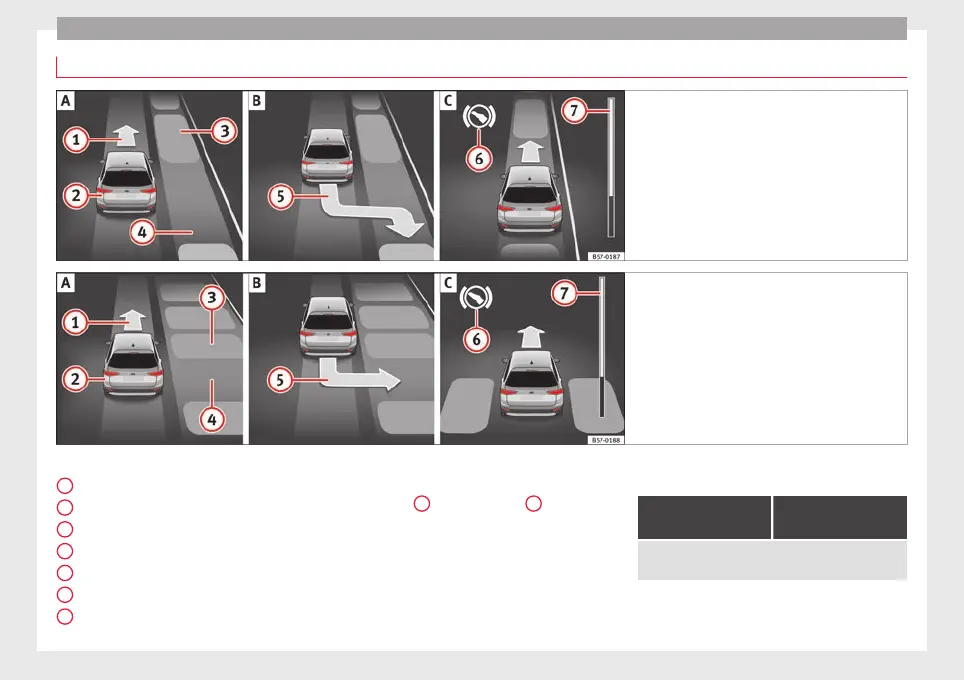
Fig. 220 On the instrument panel display: paral-
lel p
arking. Finding a parking space. Park-
ing position. Manoeuvring.
Fig. 221 On the instrument panel display: per-
pendicul
ar parking. Finding a parking space.
Parking position. Manoeuvring.
Key to Fig. 220 and Fig. 221:
M
e
s
sage to move forwards
Your vehicle
Parked vehicle
Parking space detected
Message to park
Message to press the brake pedal
Progress bar
1
2
3
4
5
6
7
Progress bars
The pr
ogr
e
ss bar
››› Fig. 220
7
and ›
›› Fig. 221
7
on the
s
c
r
een of the instrument panel displays the
relative distance to be covered. The greater
the distance, the fuller the progress bar.
When driving forward, the content of the pro-
gress bar decreases upwards, and when re-
versing, it decreases downwards.
Necessary conditions to park with Park As-
sist
For parallel parking
spaces
For perpendicular
parking spaces
The traction control system (ASR) must be turned on
››› page 191.
254



 To Next Page