The essentials
Menu Function
Detection of
traffic
signs
Display of traffic signs ››› page 245:
Fatigue de-
tection*
Switching the fatigue detection on
or off (pause recommendation)
››› page 248.
Status display
Bonnet, r
e
ar lid and door
s open
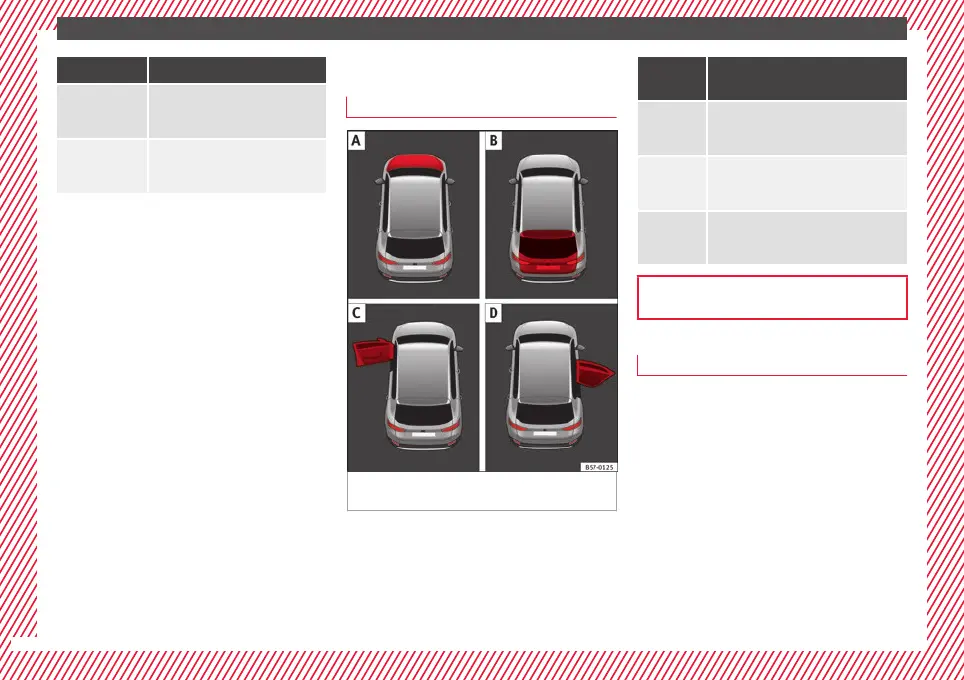
Fig. 46 A: bonnet open; B: rear lid open; C:
fr
ont
l
eft door open; D: right rear door open.
When the ignition is switched on or when
driv
in
g, the bonnet, r
ear lid or doors that are
open will be indicated on the instrument pan-
el display, and, as applicable, this will be in-
dicated audibly. The display may vary accord-
ing to the type of instrument panel fitted.
Illustra-
tion
Key to ››› Fig. 46
A
Do not continue driving!
The bonnet is open or is not properly
closed ››› page 298.
B
Do not continue driving!
The rear lid is open or is not properly
closed ››› page 137.
C, D
Do not continue driving!
A vehicle door is open or is not properly
closed ››› page 125.
››› page 115
Warning and information messages
The system runs a check on certain compo-
nents
and f
u
nctions when the ignition is
switched on and while the vehicle is moving.
Faults in the operation are displayed on the
screen using red and yellow symbols and
messages on the instrument panel display
(›››
page 119) and, in some cases, with
audible warnings. The display may vary ac-
cording to the type of instrument panel fitted.
40



 To Next Page