Seats and headrests
●
Press and hold the button
›››
Fig. 116.
●
Within the following 10 seconds, push the
open button
on the vehicle key. An audible
warning confirms the settings have been de-
activated.
Initialising the seat position memory
The position memory system must be restar-
ted if, for example, the driver seat has been
changed.
Restarting deletes all memories and assign-
ments for the seat with position memory. The
memory buttons can then be reprogrammed
and the vehicle keys re-assigned.
●
Open the driver door and do not get into
the vehicle.
●
Operating the seat settings from outside
the vehicle.
●
Move the angle of the seat backrest com-
pletely forwards.
●
Release the control to set the angle and
then press again until an audible warning is
heard.
WARNING
Adjust the memory function only when the
vehicle is stationary.
Note
If the driver door is opened approx. 10 mi-
nutes after the vehicle was unlocked or lat-
er, the driver seat and the exterior mirrors
do not move automatically.
Folding down and raising the rear
seat backrest
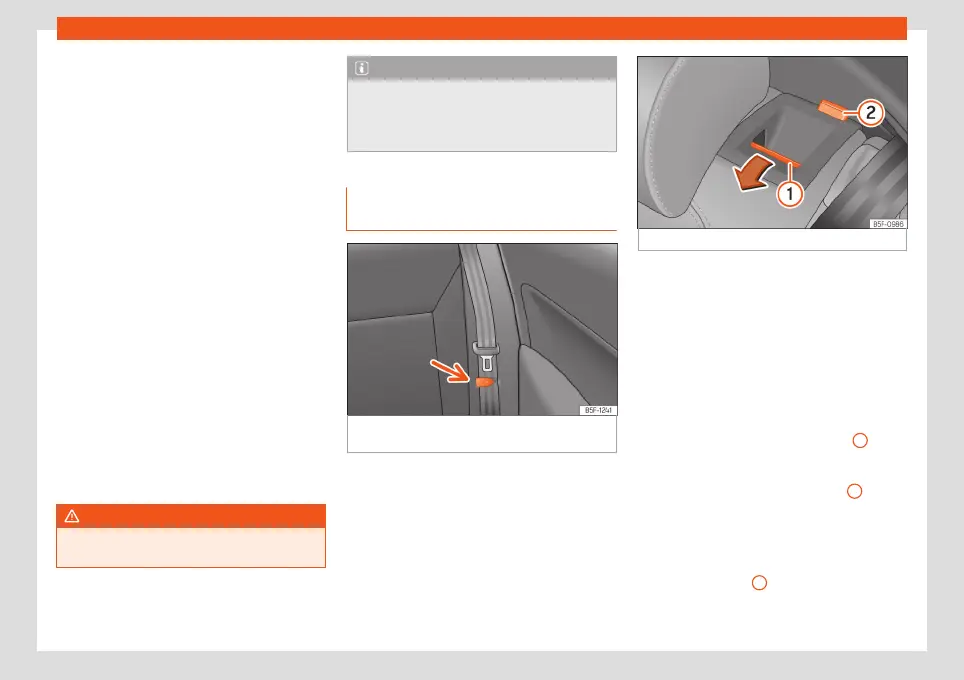
Fig. 117
Rear seat: clip to hold the seatbelt in
place.
Fig. 118
Rear seat: folding the backrest.
The rear seat backrest is split and each part
be lowered separately to extend the luggage
compartment.
Folding the backrest forwards
●
Place the side seat belts in the trim clip
›››
Fig. 117.
●
Completely lower the rear headrests
›››
page 133.
●
Press the unlock button
›››
Fig. 118
1
for-
wards and at the same time fold the backrest
down. The rear seat backrest is not engaged
when the red marking of the button
2
is visi-
ble.
Converting the table to a seat
●
Raise and lock in the back rest. The red
marking on the tab
2
should no longer be
visible when the backrest is properly secured.
»
135



 To Next Page