Driver assistance systems
- 10 km/h (5 mph)
Interrupting the adjustment
●
Press the
button.
The speed is stored.
Reinstating the cruise control
●
Press the
button.
The limiter will re-activate as soon as the ve-
hicle is moving at a speed lower than the
saved one.
Switching off
●
Press and hold the button
.
The speed limiter switches off and the speed
is deleted.
Switch to cruise control (GRA) or adaptive
cruise control (ACC)
●
Press the
button.
●
Observe the corresponding message on
the instrument cluster display.
The speed limiter is switched off.
Note
Depending on the equipment, the speed
limiter can be found on the multifunction
steering wheel or on the turn signal lever.
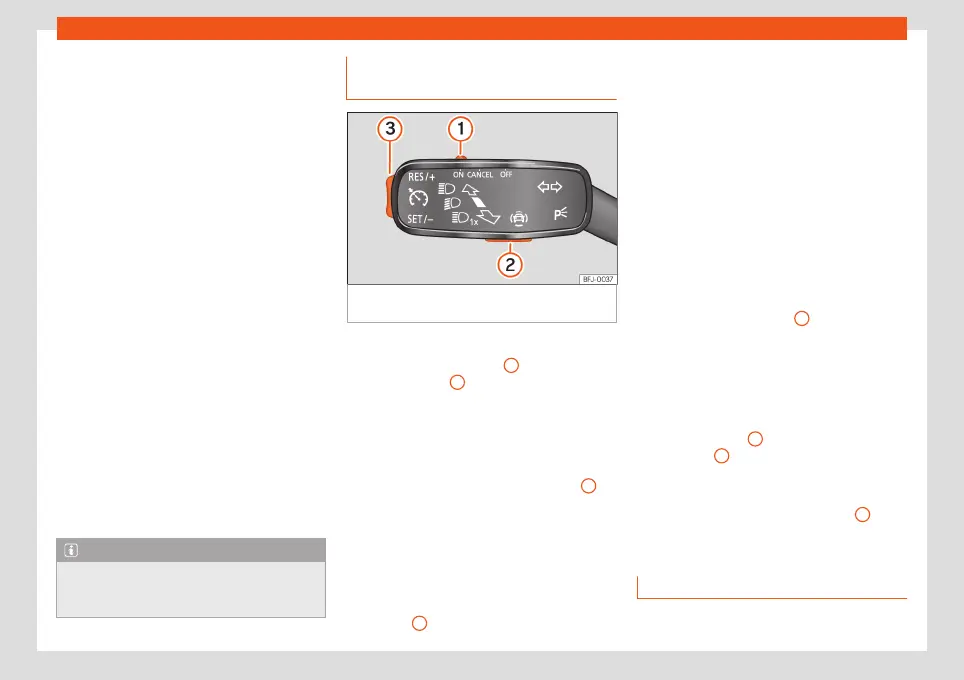
Operating the speed limiter with
the turn signal lever
Fig. 175
On the turn signal lever: buttons to
operate the speed limiter.
Connecting
●
Move control
›››
Fig. 175
1
to position
and press button
2
.
The last programmed speed is stored. It does
not take effect yet.
Activating the speed limiter
●
While driving, press button
›››
Fig. 175
3
in
the area
.
The current speed is stored as the maximum
speed.
Setting the programmed speed
You can set the speed using button
›››
Fig. 175
3
:
●
Briefly press area to increase speed in
small increments of 1 km/h (1 mph).
●
Press and hold the area
to continu-
ously increase speed in increments of 10
km/h (5 mph).
●
Briefly press area
to decrease speed
in small increments of 1 km/h (1 mph).
●
Press and hold area
to continuously
decrease speed in increments of 10 km/h (5
mph).
The speed is limited to the set value.
Switching off the speed limiter
●
Move control
›››
Fig. 175
1
to position
.
The system switches off.
Switching off temporarily
If you want to temporarily deactivate the
speed limiter, e.g. for overtaking, move the
control
›››
Fig. 175
1
to position
or
press button
2
.
After overtaking, the speed limiter can be ac-
tivated with the previously programmed
speed by pressing button
›››
Fig. 175
3
in the
area
.
Troubleshooting
The speed limiter is not active.
»
243



 To Next Page