Operation
menu. Some warnings can be confirmed and
hidden with the button
›››
Fig. 71
1
.
Select a menu or an informative display
●
Switch the ignition on.
●
If a message or vehicle symbol is displayed,
press button
1
; if necessary, several times.
●
To display the menus
›››
page 72 or to re-
turn to the selection of menus from a menu or
from an informative display, hold down the
rocker button
2
.
●
To change from one menu to another, press
the upper or lower part of the rocker switch.
●
To open the menu or the informative display
shown, press button
1
or wait a few seconds
until the menu or the informative display
opens automatically.
Changing menu settings
●
In the menu displayed, press the upper or
lower part of the rocker switch
2
until the re-
quired menu option is checked. The option
appears framed.
●
Press button
1
to make the required modi-
fications. A mark indicates that the system or
function is activated.
Back to menu selection
Select Back on the corresponding menu to
exit.
Note
If when switching on the ignition warnings
are shown about existing faults, it might not
be possible to change the settings or show
the information as described. In this case,
go to a specialised workshop and request a
repair.
Button for the driver assistance
systems*
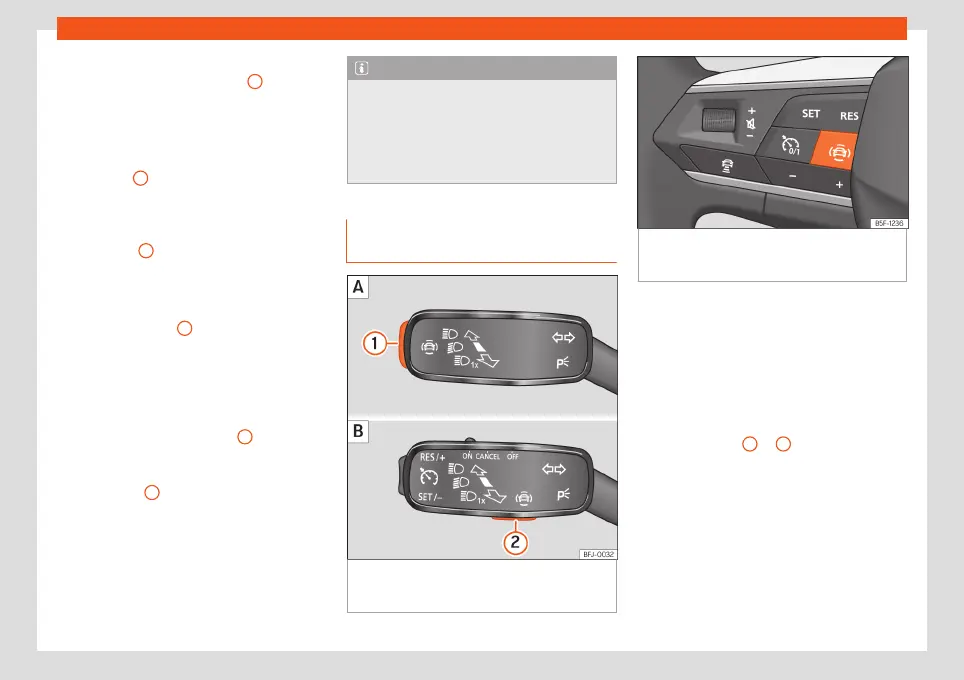
Fig. 72
On the turn signal and main beam lev-
er: button for driver assistance systems (de-
pending on versions).
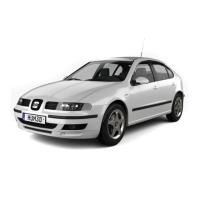
Fig. 73
Left side of the multifunction steering
wheel: button for driver assistance systems
(depending on versions).
With the turn signal and main beam headlight
lever button, you can activate or deactivate
the driver assistance systems displayed in the
Assistance systems menu .
Activating or deactivating a driver assis-
tance system using the turn signal lever
and main beam headlight
●
Press
›››
Fig. 72
1
or
2
briefly to open the
Driving aids menu.
●
Select the driver assistance system and ac-
tivate or deactivate it
›››
page 85. A mark in-
dicates that driver assistance system is
switched on.
●
Afterwards, mark or confirm the selection
with button
on the windscreen wiper
lever or button
on the multifunction steer-
ing wheel .
86



 To Next Page