Opening and closing
Note
●
Leaves and other l
oose objects that ac-
cumulate on the sunroof rails should be
regularly cleaned away either by hand or
with a vacuum.
●
If the sunroof does not work correctly, the
anti-trap function will not work either. Con-
tact a specialised workshop.
Operating the sunroof
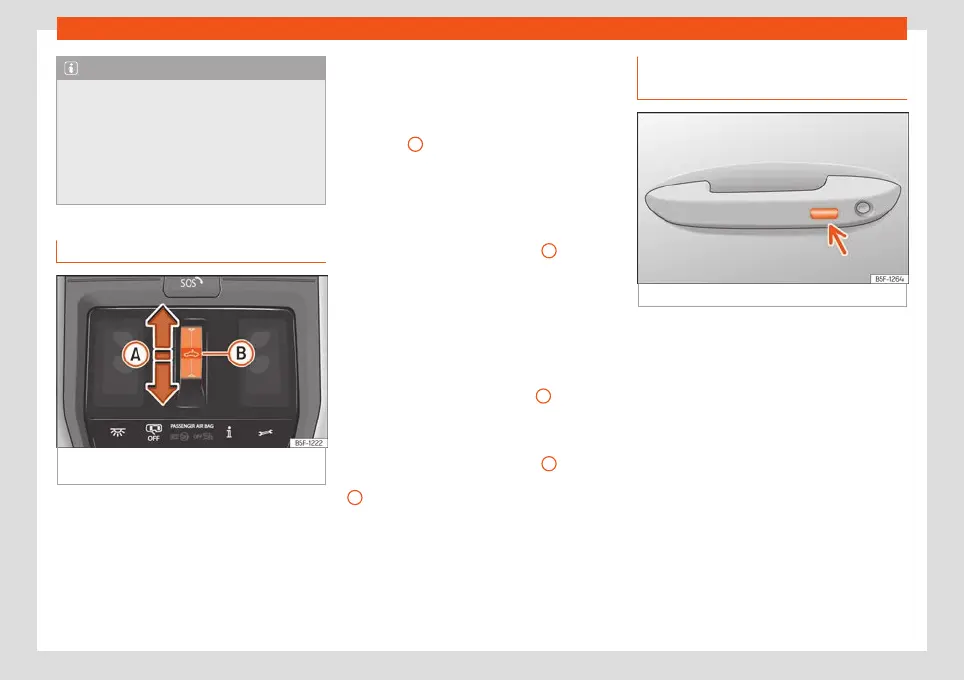
Fig. 88
On the interior roof lining: sunroof but-
t
on.
Functional area can be oper
at
ed in tw
o
ways: sliding and pressing.
Sliding: The roof is opened or closed totally
or partially.
Pressing: The roof is raised, opened or
closed totally or partially. Press again to stop
the automatic movement.
Raising, opening and closing the sunroof
Opening the sunroof:
●
Automatic movement: slide your finger
back over the functional area
›››
Fig. 88
A
.
●
Manual movement: slide back over the
functional ar
ea
and keep it there.
Closing the sunroof:
●
Automatic movement: slide your finger for-
ward over the functional area
A
.
●
Manual movement: slide forward over the
functional ar
ea and k
eep it ther
e.
Raising the sunroof:
●
The sunroof can only be raised if it is
closed.
●
Automatic movement: press briefly in the
centre of the functional area
B
Closing the sunroof when raised:
●
Automatic movement: slide your finger for-
w
ar
d o
ver the functional area
A
or pr
ess
briefly in the centr
e of the functional ar
ea
B
.
St
op the aut
omatic opening or cl
osing move-
ment:
●
Press again on the functional area .
Convenience function to open or
close the sunroof*
Fig. 89
Door handle: sensor surface.
The sunroof can be opened and closed with
the conv
enience function, just lik
e the win-
do
ws.
Using the door lock*
●
Hold the key in the door lock of the driver
door in either the unlocking or locking posi-
tion to open or close the roof in the tilted po-
sition. Release the key to interrupt this func-
tion.
Using the remote control
●
Keep the locking or unlocking button press-
ed to open or close the roof. If you release the
button is the opening or closing will stop.
»
109



 To Next Page