Operation
system menu using the function button >
Int
erior > Lighting
›
››
page 87).
Note
●
The reading lights go out when the vehi-
cl
e is closed and locked or after a few mi-
nutes of turning the ignition off. This pre-
vents the battery fr
om discharging.
Ambient light*
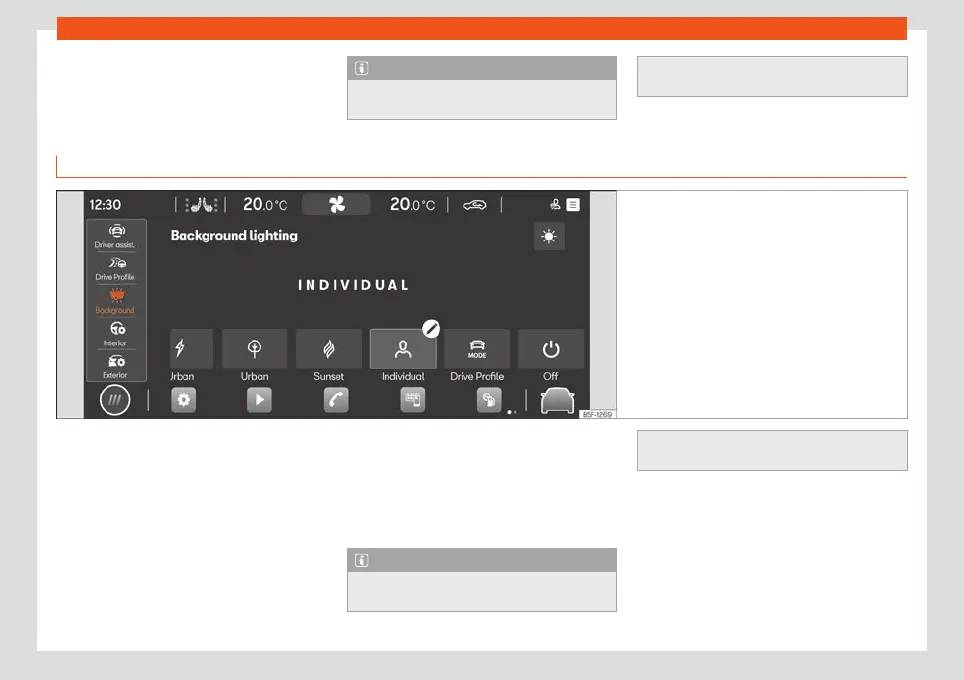
Fig. 94
Schematic representation: Ambient light
The ambient light lights up the area of the
centr
e consol
e
, the footwell area and, de-
pending on the version, the front door panels
and the instrument panel line.
There are predefined Ambient Light versions
›››
Fig. 94. The intensity of the lighting can be
adjusted using the function button :
●
Automatic: lights up the interior of the vehi-
cle depending on the selected driving mode.
●
Manual: to adjust the intensity of the ambi-
ent light in each of the areas as well as to
change the colour in the versions that have
lighting on the front door panel and the in-
strument panel line.
●
Off: turns off the ambient light.
Note
In some versions, the colour indicated on
the Infotainment scr
een may not match the
actual colour of the vehicle's interior light-
ing.
118



 To Next Page