Operation
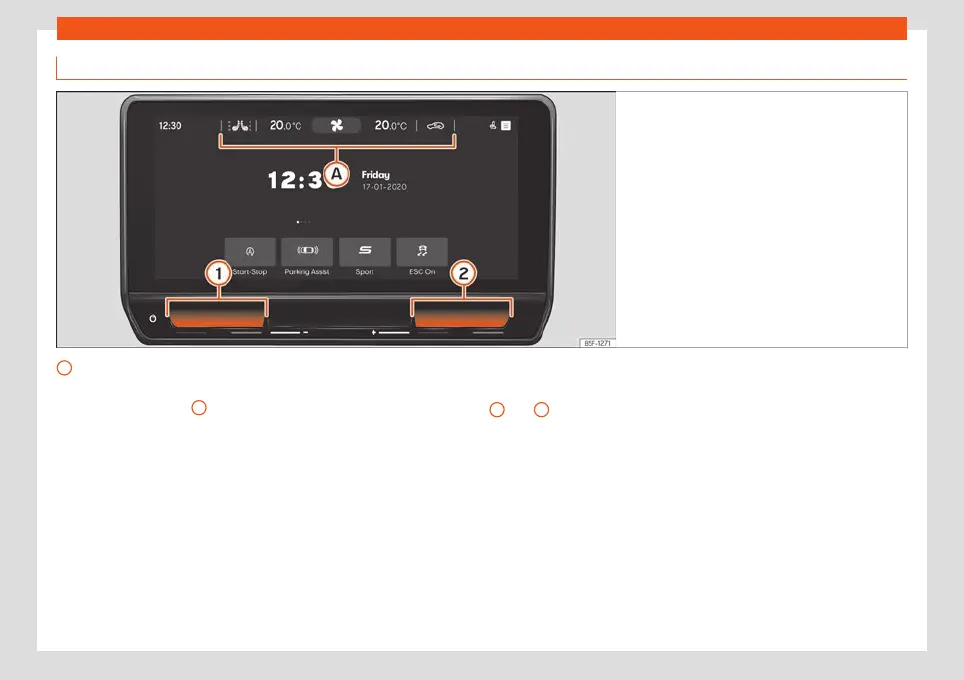
Climatronic control
Fig. 136
Schematic representation: air condition-
ing functions
A
Climabar
Fix
ed bar at the t
op of the Inf
otainment Sys-
tem screen
›››
Fig. 136
A
, (even if it is discon-
nect
ed) wher
e the f
ollowing Air Conditioning
functions are located:
Shows fan status/speed. By pressing it, you
can access the Air conditioning menu
›››
page 147.
.
°C
Slide your finger from left to right or vice ver-
sa over the numbers to adjust the desired
temperature.
Press on the same numbers to access the
temperature adjustment submenu.
Or: use the touch zones
1
and
2
(blue /
r
ed) t
o adjust the t
emperature of the Air Con-
ditioning
›››
Fig. 136.
Access the seat heating* submenu
›››
page 150.
Switching air recirculation on and off
›››
page 149
Temperature setting submenu
Submenu where the following functions are
found:
.
°C
Slide your finger from left to right or vice ver-
sa over the bar, or, press or to adjust the
desired temperature. In versions with 1-zone
Climatronic, only one temperature can be
set.
Synchronise the temperature on the driver's
side with the rest of the zones (only versions
with 3-zone Climatronic).
146



 To Next Page