Infotainment System
a mobile phone device when switched on
may interfer
e with sensitive technical and
medical equipment, possibly resulting in
malfunction or damage to the equipment.
Note
If the playback volume is excessive or dis-
tort
ed, the speakers may be damaged.
Overview and controls
Connect System
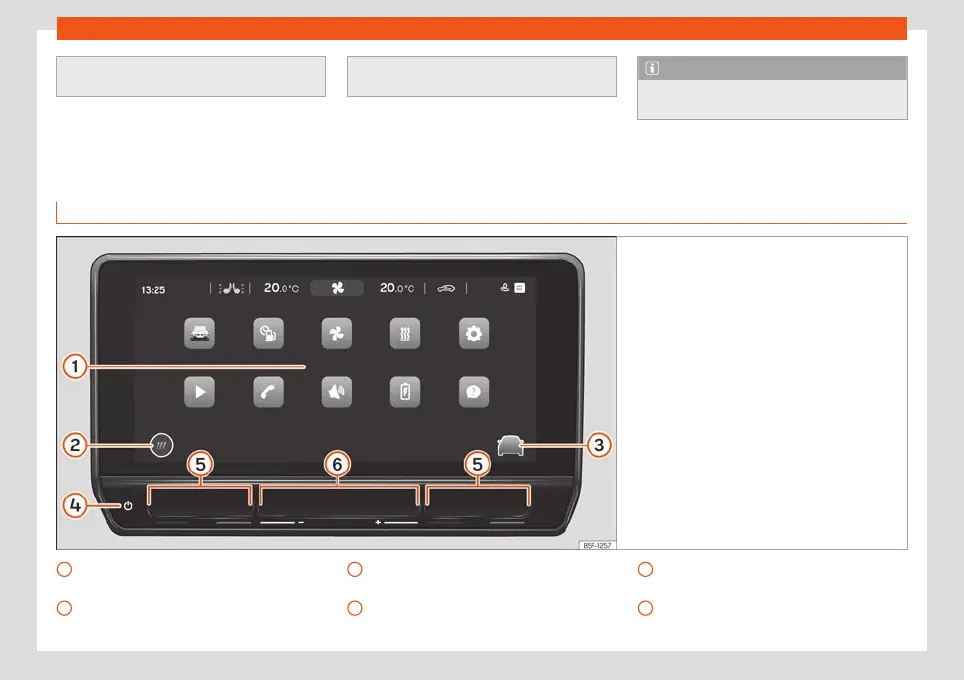
Fig. 138
Overview: control unit and indication in
the 10-inch v
ersion
Touch screen. The infotainment functions
can be used thr
ough the scr
een.
HOME butt
on (to open the home page).
1
2
Direct access button to the assist sys-
t
ems and v
ehicl
e settings.
Touch zone (to turn the infotainment sys-
tem on or off).
3
4
Touch zones (to raise and lower the air
conditioning t
emper
at
ure).
Touch zones (to raise and lower the vol-
ume).
5
6
156



 To Next Page