Help with parking and manoeuvring
Parking
●
Look at the display on the instrument panel
t
o see if the space has been det
ect
ed as “ap-
propriate” and if the correct position for park-
ing has been reached
›››
Fig. 186
or
›››
Fig. 187 . The space is considered
“appropriate” if the display on the instrument
panel shows the message to park
5
.
●
Stop the vehicle and, after a brief pause,
engage the r
e
v
erse gear, or press the button
in the infotainment system, > Driver as-
sistance> Park Assist system.
●
Release the steering wheel
›››
in Intro-
duction on page 261.
●
Please note the following message: Inter-
vention in active direction. Watch
your surroundings!. Whil
e you k
eep w
atch
around you, carefully start accelerating up to
no more than 7 km/h (4 mph). During the
parking manoeuvre, the system only takes
charge of the steering. You, as the driver,
have to accelerate, engage the clutch if
necessary, change gears and brake.
●
Reverse until the continuous ParkPilot sig-
nal sounds; OR: reverse until the indication to
move forward appears on the instrument
panel display
›››
Fig. 186 or
›››
Fig. 187 ;
OR: reverse until the Park Assist finish-
ed message appears on the instrument panel
display. The progress bar
7
indicates the
dist
ance t
o co
ver
›››
page 265.
●
Press the brake pedal until the parking as-
sist system completes the steering wheel
turns; OR: until the symbol goes out on the
instrument panel screen.
●
Select first gear.
●
Move forward until the continuous ParkPilot
signal sounds; OR: move forward until the re-
verse indication appears on the instrument
panel display. The Park Assist system steers
the vehicle forward and back until it centres it
in the space
›››
Fig. 186 or
›››
Fig. 187 .
●
For best results, wait at the end of each
manoeuvre until the Park Assist system has
finished turning the steering wheel. The park-
ing manoeuvre ends when a corresponding
message is displayed on the instrument pan-
el and, in some cases, an acoustic signal
sounds.
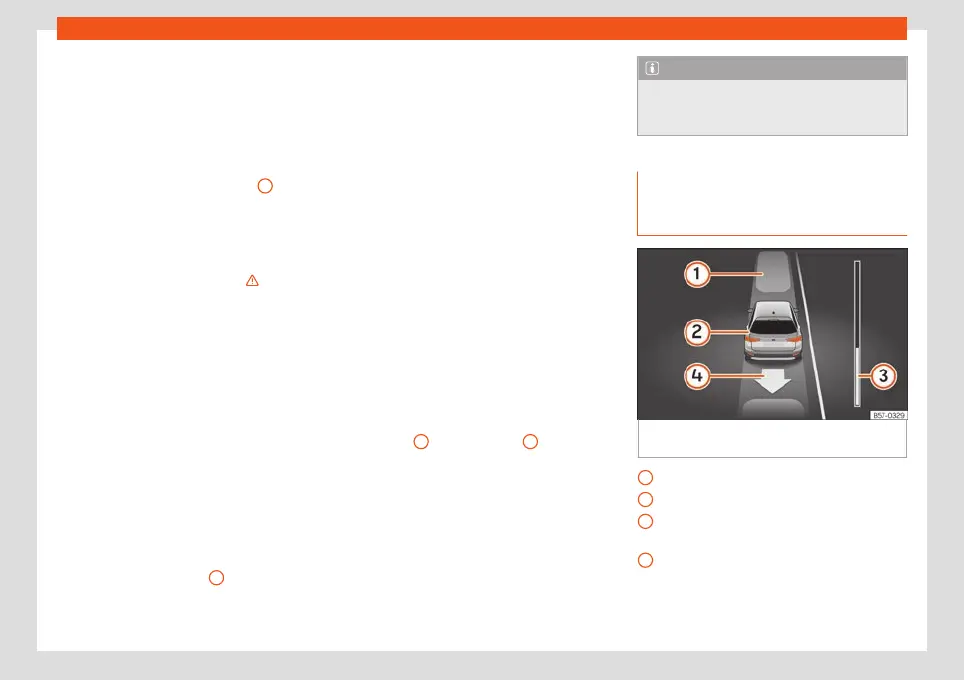
Progress bars
The progress bar
›››
Fig. 186
7
and
›
›
›
Fig. 187
7
on the
scr
een of the instrument panel displ
ays the
r
elative distance to be covered. The greater
the distance, the fuller the progress bar.
When driving forward, the content of the pro-
gress bar decreases upwards, and when re-
versing, it decreases downwards.
Note
If the manoeuvre is terminated prematurely
during parking, the result may not be the
best.
Leaving a parking space with the
parking assist system (only for par
-
allel parking)
Fig. 188 On the instrument panel display: exit
a par
all
el parking space
.
Parked vehicle
Y
our v
ehicl
e in reverse gear
Progress bar to indicate the distance left
to cover
Message giving the proposed manoeuvre
to exit the parking space
»
1
2
3
4
265



 To Next Page