Model 880/881 13
GB
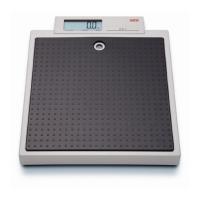
How to weigh properly
– The scale is fitted with a vibration
switch. You need only step lightly onto
the weighing platform to switch on the
scale.
SE(A, 8.8.8.8.8. and 0.00 appear consecu-
tively in the display. The scale is then
automatically set to zero and ready for
use.
– Switch weight display if required (see
below)
– Step on the scale and keep still.
– Read off the weighing result on the dig-
ital display.
– If a load of over 200 kg or 440 lbs is put
on the scale,
St0P appears in the dis-
play.
Automatic switch-off/stand-by mode
If no further weighing operations are performed, the scale switches off automatically after
a certain time:
in normal mode: after 20 seconds
with the mother-and-baby function switched on: after 2 minutes
Switching weight display
The weight display can be switched be-
tween kilogrammes (kg) and pounds (lbs).
– Switch on the scale. The weight is first
displayed in the last setting selected
– In order to display weight in kilo-
grammes, press the kg/lbs switch until
kg appears in the display.
– To display weight in English units, press
the kg/lbs switch until lbs appears in
the display.
On the seca 880, weight is displayed in
pounds (lbs) and on the seca 881 in
pounds and ounces (lbs:oz).
Visit www.Balances.com Your Authorized Seca Dealer


 To Next Page