Sleep
Press Slee p Mon itor icon, We ar wa tch on sleepin g tim e
conne ct wi th th e APP, Sleep Re cor d will show detail on t he
Phone AP P
Weathe r
Press Wea ther icon, Rea d tod ay we ather (Keep yo ur wa tch
conne ct wi th th e APP)
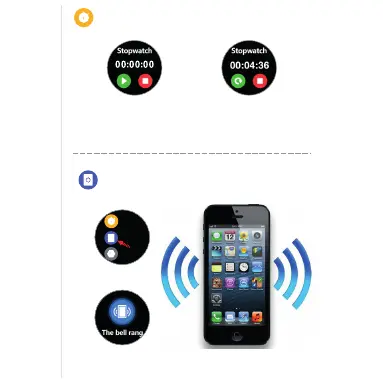
Stopwatch
Press Stop Watch ic on, P res s “strat” Start on co unt ing t ime
1/100 seco nd. P ress “ Stop” to recor d or Pr ess “ Resume”
to start cou nti ng ag ain
Find Phone
Find Phone
The watch will show “The bell rang”
icon. Than your Phone will Virbate.
Fin d Phone
Set tings
Sto pwatc h
One touch on Find Phone
Press Heart Rate icon, Start heart rate record, Wear position
must right. After 12 second Heart Rate record will show.
Heart Rate
Cronómetro
Localizar telefone
Localizar telefone
Premir o ícone do cronómetro, premir “Iniciar” inicia o tempo de contagem 1/100
segundos. Premir “Stop” para registar ou premir “Retomar” para iniciar de novo
a contagem
Um toque em Localizar
telefone
O relógio mostra o ícone
de “tocar à campainha”. Em
seguida, o telefone vibra.



 To Next Page