Press About wat ch ic on, R ead w atc h name, Bluetoo th MA C
address and So ftw are v ers ion
Press Fac tor y mod e ico n, Se lect tick to rese t you r wat ch in
Fcatory M ode
Settings
Sed ent ary
mod e
Do not
dis tur b
Bri ght ness
Shu t down
Lau age s
Res tor e
Fac tor y
Abo ut watch
Setting Manual
Fin d Phone
Set tings
Sto pwatc h
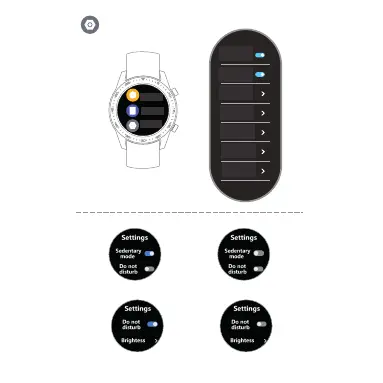
Setting Sedantary Mode
Setting Do Not Dis turb Mode
Press sma ll Bu tto n to tu rn on /off Sedantary o r Do No t Dis tur b Mod e
Setting Bright ness Mode
Press Bri ght nes s ico n, Se lec t the brightnes s of yo ur sc ree n
Press Wa tch O FF icon, Select tick t o tur n off yo ur wa tch
Shut Down
Restore Factory
Restore Factory
Definições
Ecrã de definições
Modo
sedentário
Cronometro
Trova
telefono
Impostazioni
Não
incomodar
Brilho
Desligar
Idiomas
Restaurar
predefinições
de fábrica
Sobre o relógio
Definir modo sedentário
Definir modo não incomodar
Premir o botão pequeno para ligar/desligar o movo
sedentário ou o modo não incomodar



 To Next Page