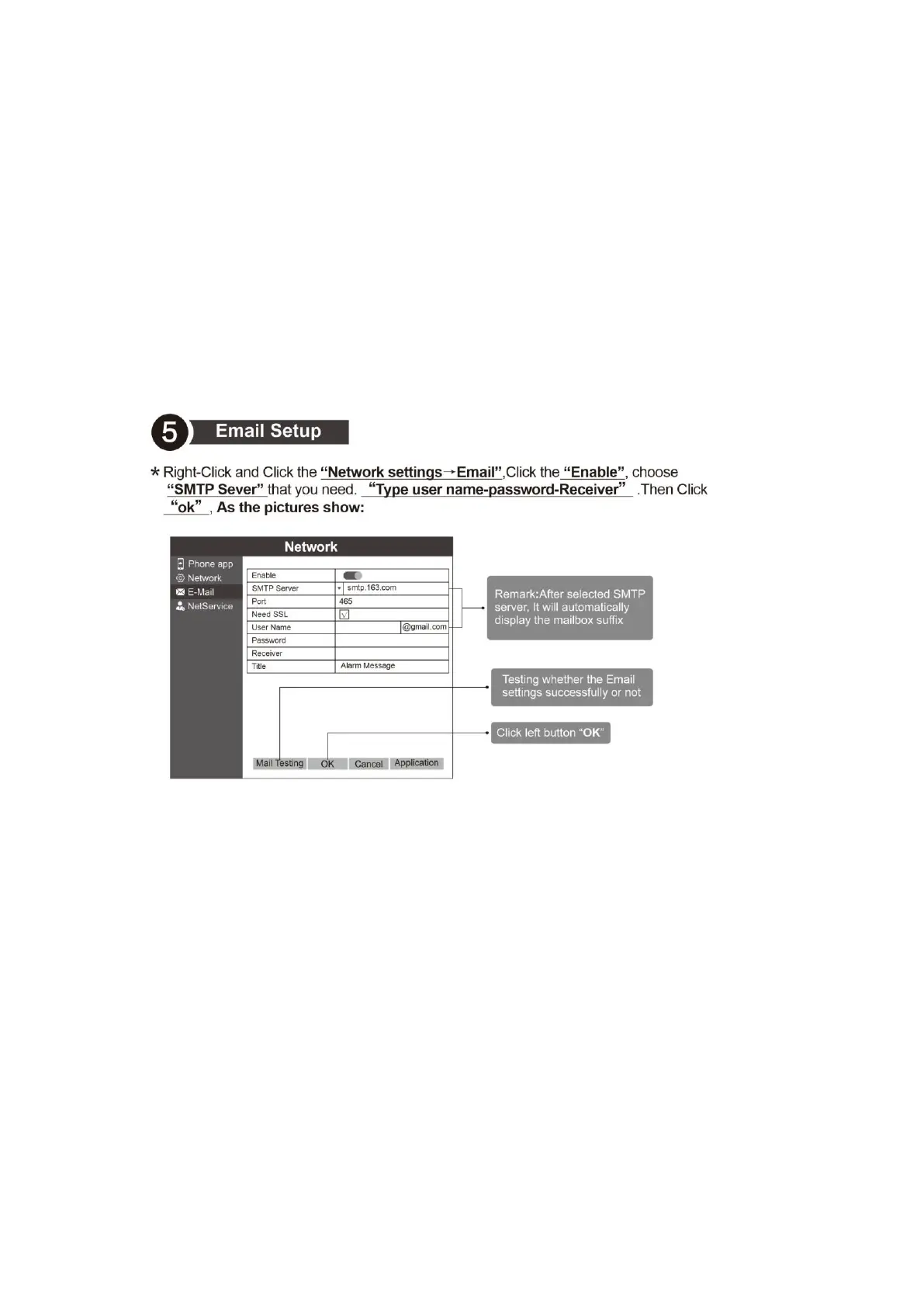
5. Email Setup
Right-Click and Click the “Network settings→Email”,Click the “Enable”, choose“SMTP
Sever” that you need. “Type user name-password-Receiver”. Then Click“ok”, As the
pictures show:
Remark: After selected SMTP server, it will automatically display the mailbox suffix
Testing whether the Email settings successfully or not
Click left button “OK”
All e-mail needs to be enabled with SMTP / POP3 protocol functions before they can be
used.
The default subject of the email is Alarm Message, and it is very likely that the subject of
the email will be blocked by the mailbox system.
6. Network setup
6.1. Connect internet, Right-Click and Choose the“Network settings→Network”. Choose
“DHCP Enable”, Then Click “ok”. As Pictures show:
IP address Default: 192.168.1.10
Subnet mask Default: 255.255.255.0
Gateway Default: 192.168.1.1
Click left button “OK”



 To Next Page