Certificates have time durations in which they are valid. Ensure that the certificates
uploaded are valid and that the Date and Time settings have been set correctly on the
SnapGear unit.
IPSec Failover
Note
SG560, SG565, SG570, SG575, SG580, SG710 only.
The SnapGear unit can be configured to failover and fall forward between IPSec
connections. Two common scenarios are described below.
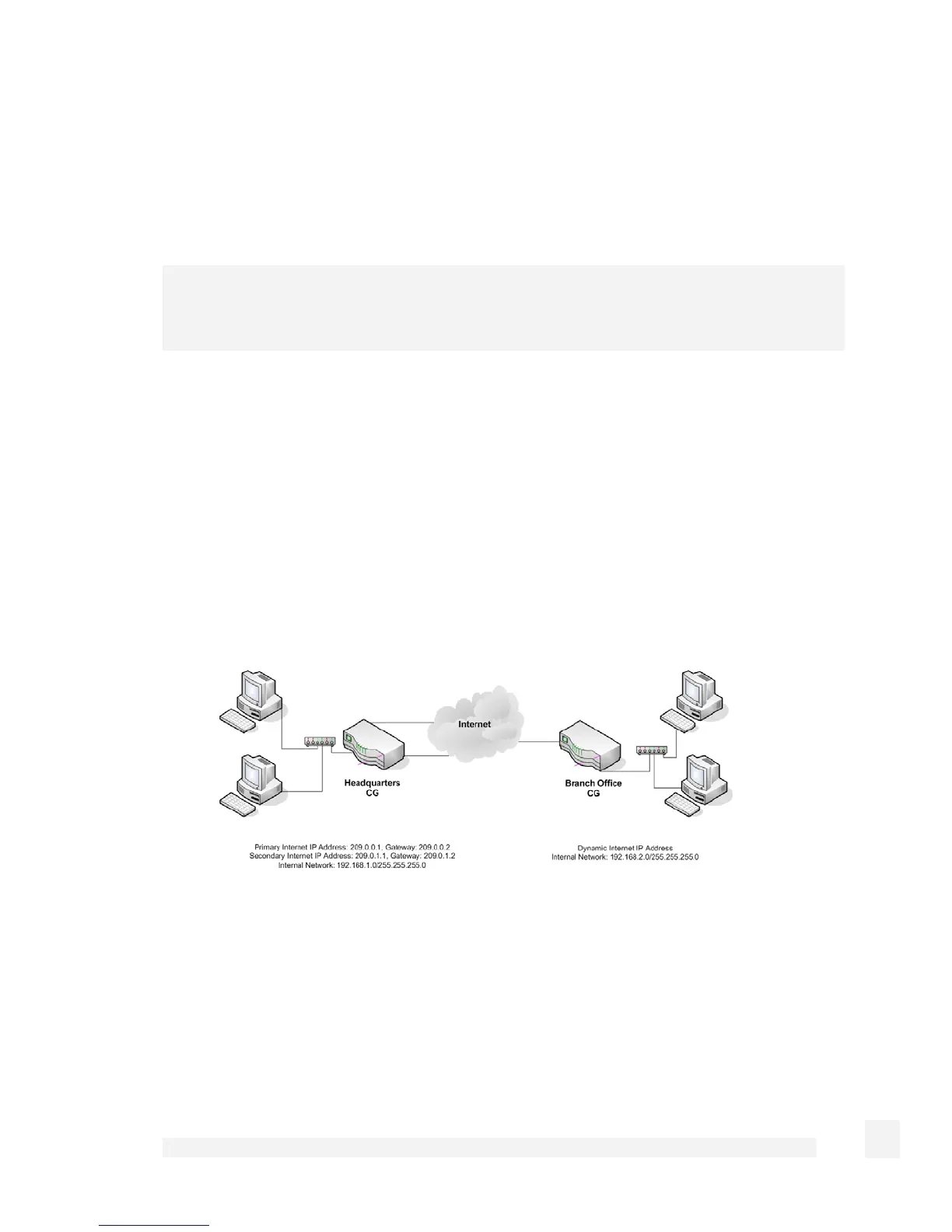
The following scenario assumes that the Headquarters SG has two static Internet IP
addresses and the Branch Office SG has a dynamic Internet IP address. The Branch
Office SG establishes an IPSec tunnel to the primary Internet IP address at the
Headquarters SG as the primary IPSec tunnel path. If this IPSec connection is detected
to have failed, a failover IPSec tunnel is established to the secondary Internet IP address
at the Headquarters SG. Once in the failover state, the Branch Office SG will periodically
determine if the primary IPSec tunnel path is functioning again, and if so, will fall forward
to use the primary link instead.
Setup an IPSec tunnel between the primary Internet IP Addresses (192.168.1.0/24 -
209.0.0.1 <> 210.0.0.1 – 192.168.2.0/24). Default values are used in the configuration
unless otherwise specified below:
Headquarters SG configuration:
Tunnel name: PrimaryLink
Local interface: Internet port
238
Virtual Private Networking



 To Next Page