A PPTP status icon appears in the system tray on the bottom right hand side of your
computer, informing you that you are connected.
You can now check your e-mail, use the office printer, access shared files and computers
on the network as if you were physically on the LAN.
Note
Depending on how your remote network is set up, some additional configuration may be
required to enable browsing the network (such as Network Neighborhood or My
Network Places). Refer to the following knowledge base article for further details:
http://www.cyberguard.com/snapgear/faqomatic/public_html/fom-serve/cache/70.html
To disconnect, right-click the PPTP Status system tray icon and select Disconnect.
IPSec
SnapGear unit to SnapGear unit
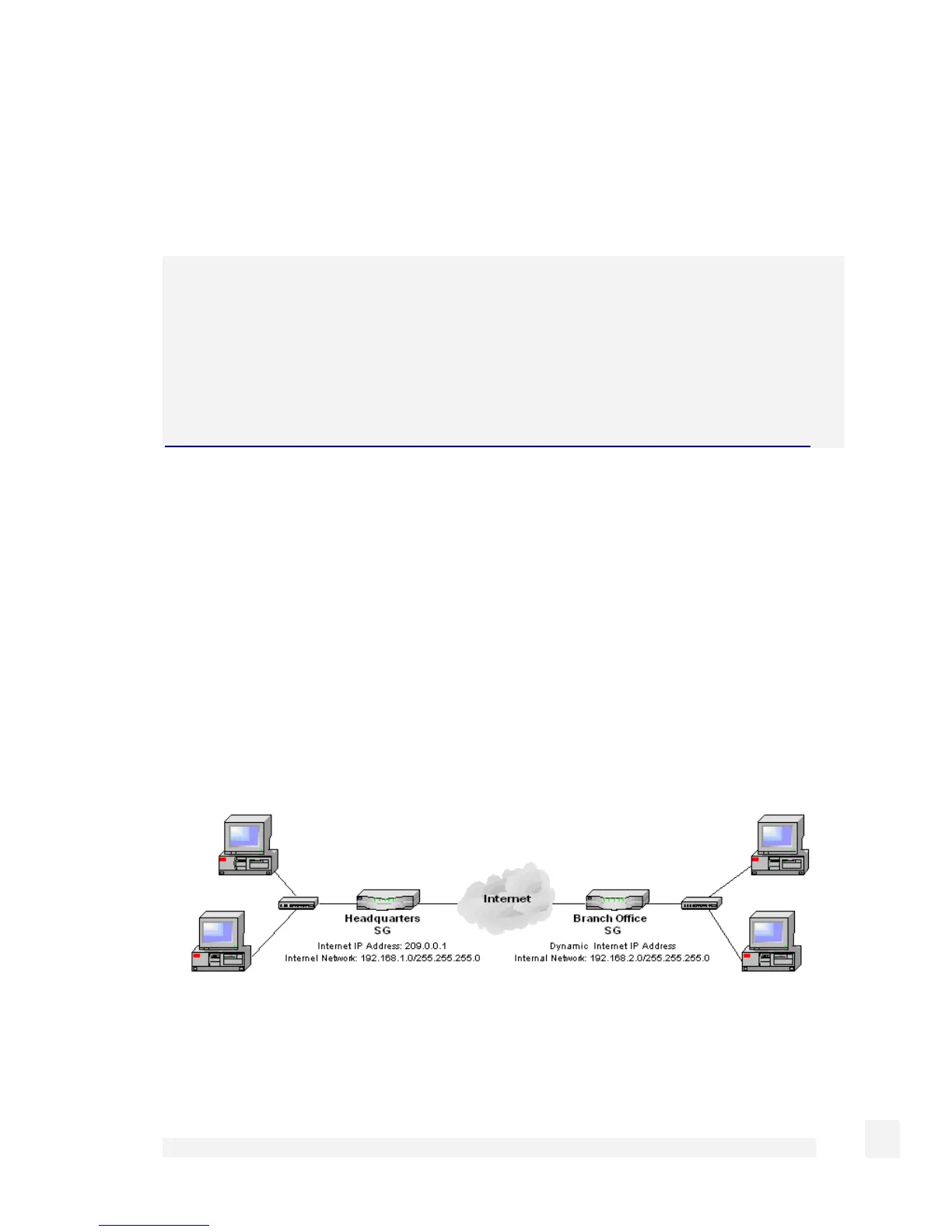
There are many possible configurations in creating an IPSec tunnel. The most common
and simplest is described in this section. First the Quick Setup provides a one-page no-
nonsense means to connect two sites together. For more control over the IPSec
configuration, the Advanced configuration wizard provides additional fields. To connect
two offices together, a network similar to the following is used.
To combine the Headquarters and Branch Office networks together, an IPSec tunnel
must be configured on both SnapGear units.
211
Virtual Private Networking



 To Next Page