Product Introduction
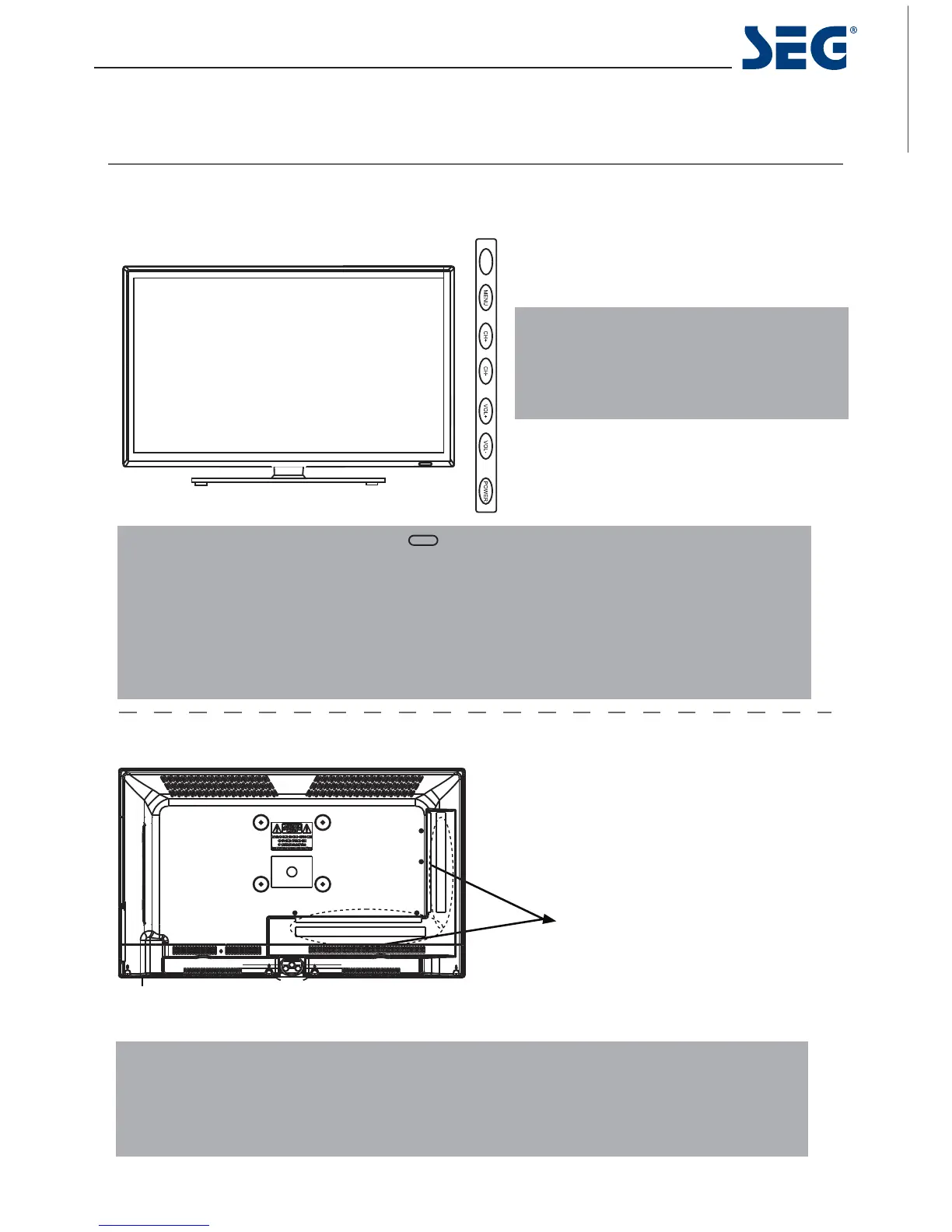
Front View
Rear View
MENU: Display/exit the OSD menu.
CH+/-: Scan through channels.
VOL+/-: Adjust the volume.
SOURCE: Display the input source menu.
POWER: Turn on/standby the TV set.
Remote Control window(keep clear)
LED indicator
(IR) Infrared Receiver: Receives IR signals from the remote control.
(Power on/Standby) LED indicator: Press POWER to turn on and off.
The effective receiving range for the signal is 5-8 metres from the front of the remote
control window, and 30
0
to the left or right side and 20
0
above or below the control
window.
Indicator on(Red) Standby mode
Indicator on(Green) Power on mode
W
a
l
l Mounting
The TV is provided with mounting holes for a VESA approved wallmounting bracket (NOT SUPPLIED).
Remove the Posi screws holding the base to the base bracket and lift the base away (do not remove the
basemounting bracket).Mount the VESA bracket using 4xM4x10mm ISO metric threaded screws (not
supplied). Do not use screws longer than 10 mm, it will occur damage to the internal parts. Fit the wall
bracket securely following themanufacturers instructions.
5
6285&(
60 cm (23.6”) LED BLU-TV Melbourne
SWITCH
Connections
See next page



 To Next Page