23
www.seuservice.com
15-2 BELT SYSTEM INFORMATION AND TROUBLESHOOTING
Belt System Information
The SpongeBob game uses opto-sensors to read the coins that land on the belt during game play. The
Belt is covered with characters and corresponding index marks on the belt’s edge.
The way a prize is awarded is to have a coin read ‘After” the index mark for that area is read and
“Before” the end of the same index area is detected.
To accomplish this, we use an Opto Board that uses reflective opto sensors which read each coin as it
passes under the Opto Board, and the Belt Reader Opto on the same board reads the index marks on the
belt’s edge.
Troubleshooting the Belt System
There are two (2) different areas in the SpongeBob Game that will allow the technician to check the
working condition of the belt opto-reader system.
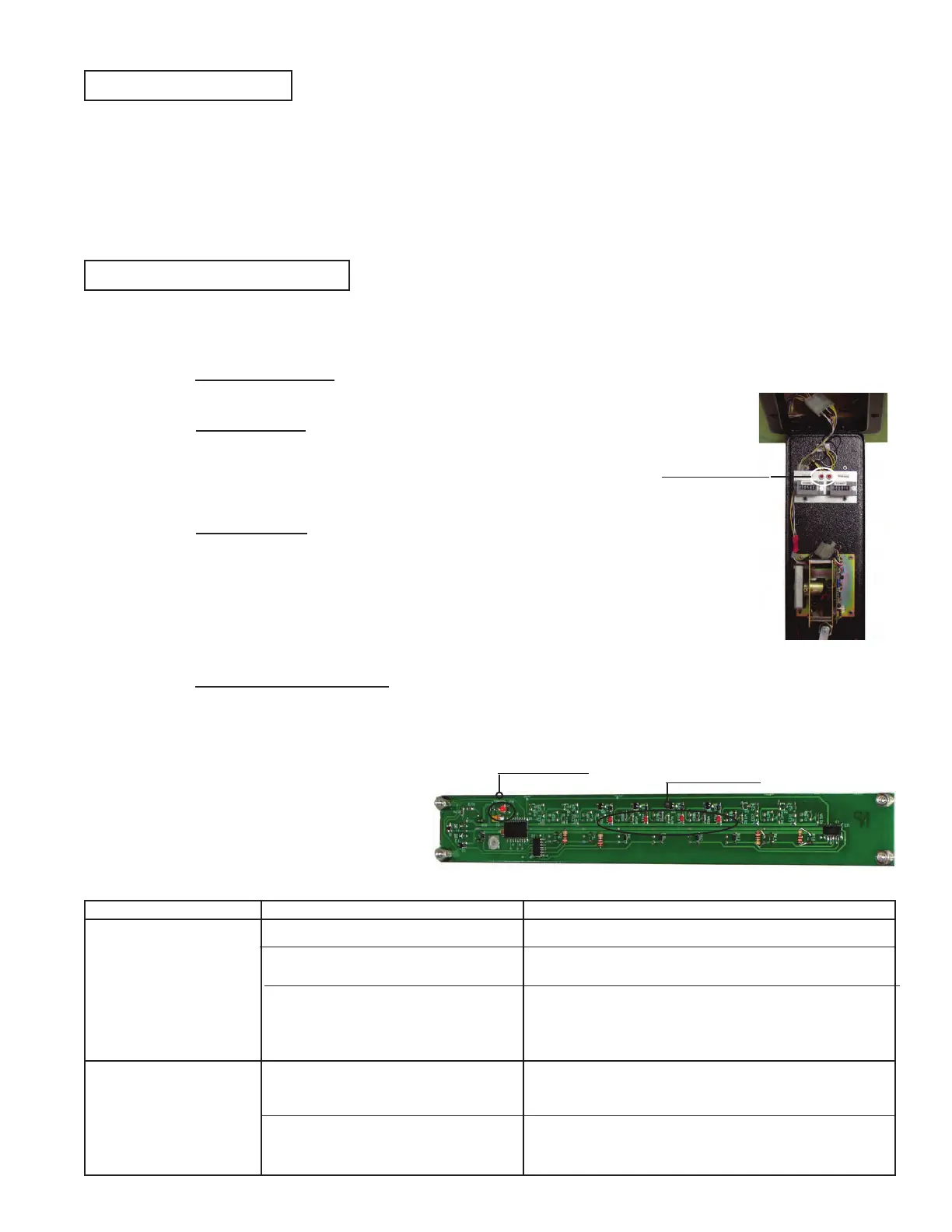
1- Ticket Door LEDs: there are two (2) sparate LED’s that are located inside the Ticket Door. They are
marked ‘Coin Opto’ and ‘Edge Opto’ (See Photo 15.1)
Ticket Door LED’s
● The Coin Opto will illuminate every time ANY of the 4 Optos on
the coin reader board detects a coin passing under it. This
indication is a multiplexed output, and will not indicate which of
the four (4) coin optos have been activated
● The Edge Opto will illuminate every time it reads a white colored
space on the edge or “index” of the belt. This is how the system
knows which square was landed on when a coin in read.
NOTE: there is one ‘Home’ position on the belt. You can observe
this on the belt when the ‘Edge Opto” LED flashes two (2) times
rapidly as the belts “Home” position goes by.
2- Coin Reader Board LEDs: There are additional LEDs under the metal cover on the Coin Reader
Board (See Photo 15.2). There is one (1) LED for each of the Coin Sensors and one (1) LED for the
Edge Opto. By removing the cover, you can see each individual opto work rahter then seeing the
multiplexed output in the ‘Coin Opto’ LED in the Ticket Door. This allows you to isolate a single
malfunctioning opto.
Photo 15. 1
Photo 15. 2
Coin Opto LEDs
Edge Opto LED
Incorrect Prizes awarded
when a player land in a
square.
Coins are not read on the
belt.
Incorrect dip switch settings
Worn out belt
Immproper initialization from coin
insertion.
Opto malfunction. Improper coin
placement.
Opto distance from belt wrong.
Assure the Settings Match the Prize card displayed
Assure that the index marks are being read by the Edge
Opto and the belt is in good condiditon. Replace Belt.
Be sure machine is properly initalized before inserting
coins. Cycle Power on unit and wait 45 seconds for
belt to make two (2) rotations. Wait for game sounds
to begin.
Assure coin is COMPLETELY within prize square.
Assure coin opto is flashing as coin passes underneath.
Repair as nessessary.
Check for spacer underneath Opto Board. If spacer
exists then remove. If there is no spacer, them perhaps
a spacer is needed to set proper distance. Add spacer.
PROBLEM CAUSE COUNTERMEASURES












 To Next Page