About basic setup options
The setup options serve to define various initial states of the printer that are executed when the
power is turned on or when the RESET key is pressed. In addition, this mode serves to
redefine the font type, character spacing, and other parameters for the printer's current
operating conditions. The parameters set in the setup options are stored in the memory of the
printer and used as the default values in initialize operations.
❏ To set this option
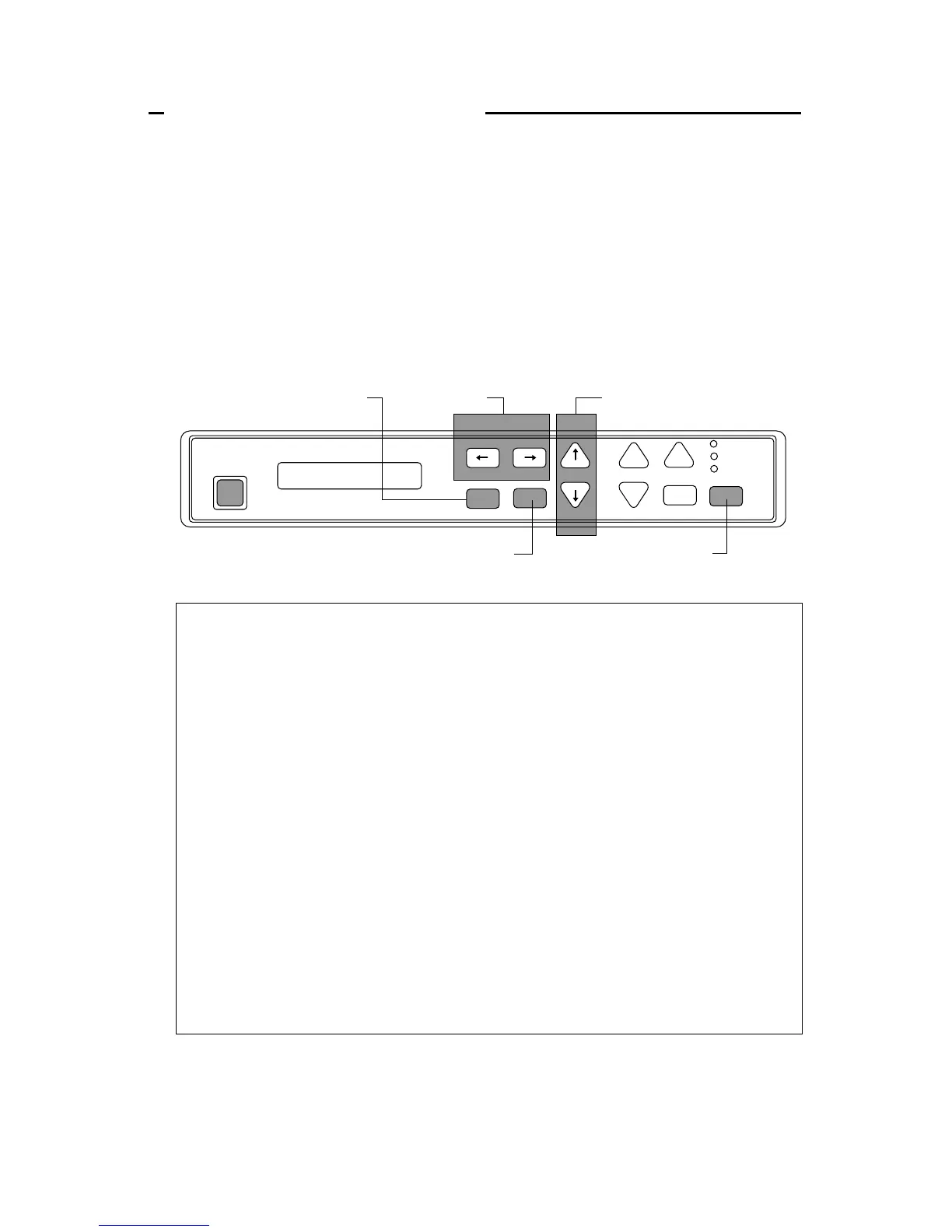
When the SETUP key is pressed in the offline mode, the printer enters the function setup
option, where various functions can be set. The keys used in the function setup mode are
described below.
← and → [Alternate to the PARK and QUALITY]
These keys are used to go over menus in the display, but cannot be used to select
a menu item.
↓ and ↑ [Alternate to the M.LF/M.RLF]
These keys are used to go over items within a menu in the display, but cannot be
used to set an item parameter.
ENTER [Alternate to the ALT]
When this key is pressed, an asterisk (*) indicating that the item is the currently
selected parameter is added at the end of the item.
EXIT [Alternate to the SETUP]
When this key is pressed, the content of the item is stored in the memory of the
printer. Then, the printer exits from the setup options and enters the offline
mode.
ONLINE
This key's function is similar to the EXIT key in that the printer saves the
selected item and exits from the setup options. At that time, if no errors or
irregular conditions exist, the printer enters the online mode.


 To Next Page