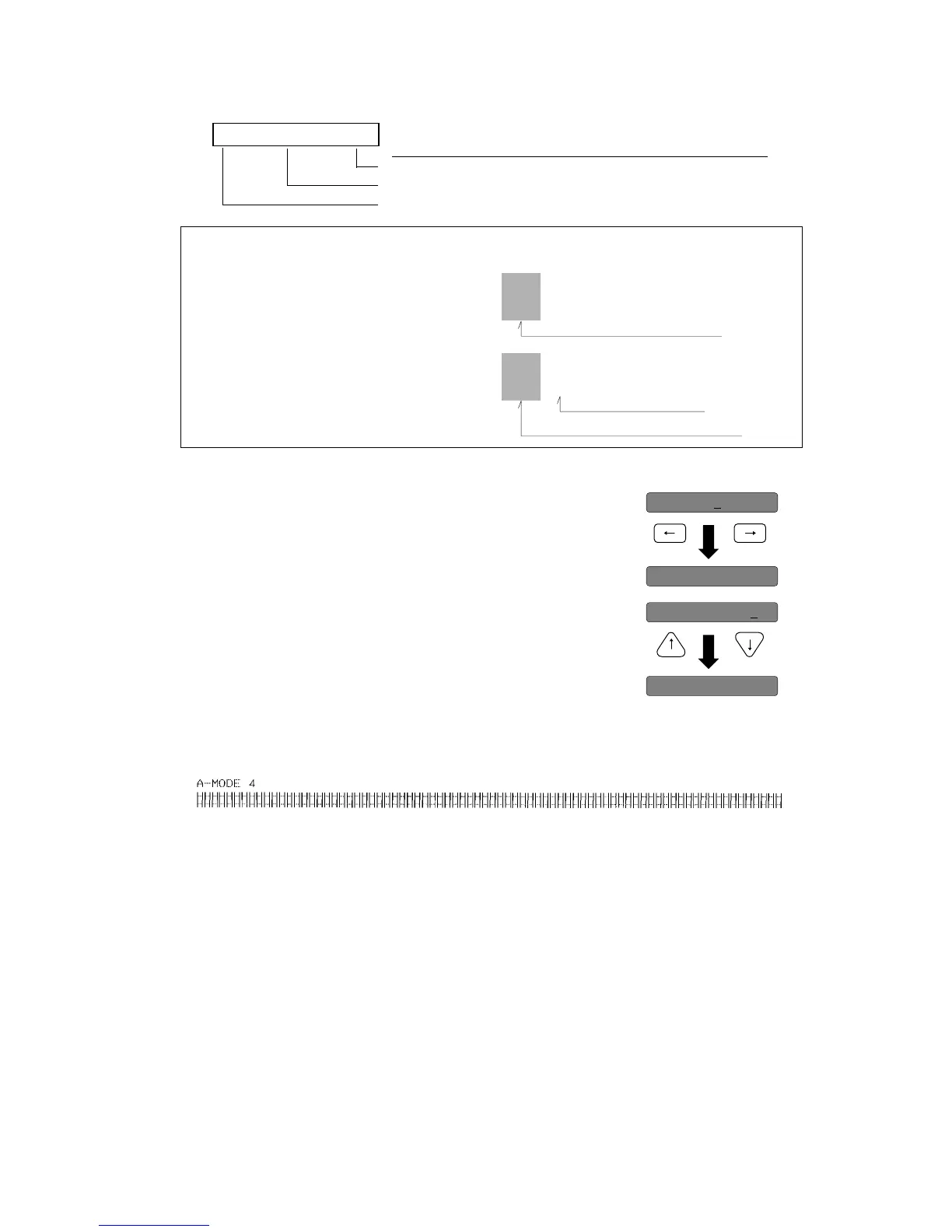
5 Pressing the Left and Right arrow key changes the Mode number
between 1 to 11 to select the best pattern within the mode.
6 Pressing the Up and Down arrow key changes the pattern number
between 0 to 12 to select the best pattern within the mode.
7 By scrolling to the desired pattern number and pressing the ENTER key, the selected printing
condition is set. When the condition is set, the corrected pattern of the selected print mode is
printed out.
8 Repeat the steps 5 through 7 until the start position adjustment is completed.
9 Pressing the EXIT key to exit from the start position adjustment (A-MODE). The bidirectional
printing adjustment (B-MODE) takes place automatically and the LCD indicates "B: VERT
ADJ".
10 Press the ENTER key to enter the bidirectional printing adjustment (B-MODE).
11 Repeat the steps 5 through 7 until the bidirectional printing adjustment is completed.
12 After all adjustments are completed, press the EXIT key, then the LCD indicates "PRESS
RESET SW". By pressing the RESET key, the printer exits from this vertical alignment mode.
LCD Description Key Operation
Pattern No. (0-12) Up and down arrow keys
Mode No. (1-11or 0-11) Left and right arrow keys
A-MODE 1: NO. 6
HHH HHHHHH HHH HHH HHH HHH HHH HHH HHH HHH HHH
HHH HHH HHH HHH HHH
HHH HHH HHH HHH HHH HHH HHH
123456789101112
*
HHH HHHHHH HHH HHH HHH HHH HHH HHH HHH HHH HHH
HHH HHH HHH HHH HHH
HHH HHH HHH HHH HHH HHH HHH
123456789101112
*
HHH
HHH
0
HHH
HHH
0
Bad aligned is chosen
>---->
>---->
A-MODE 3
>---->
>---->
A-MODE 4
Best aligned is chosen
Best aligned
EXAMPLE (To change the pattern No. 6 to 7 in A-MODE 4.)
Prepared by :: songsaluang(at)PTC
PROFESSIONAL HI - TECH CARD CO.,LTD. Tel 0-2906-5300 Fax 0-2906-5301 Email info@procard.co.th Website www.procard.co.th


 To Next Page