EasyManua.ls Logo

Seiko 6M13 - Page 16

Seiko 6M13
20 pages
Print Icon
To Next Page IconTo Next Page
To Previous Page IconTo Previous Page
Loading...
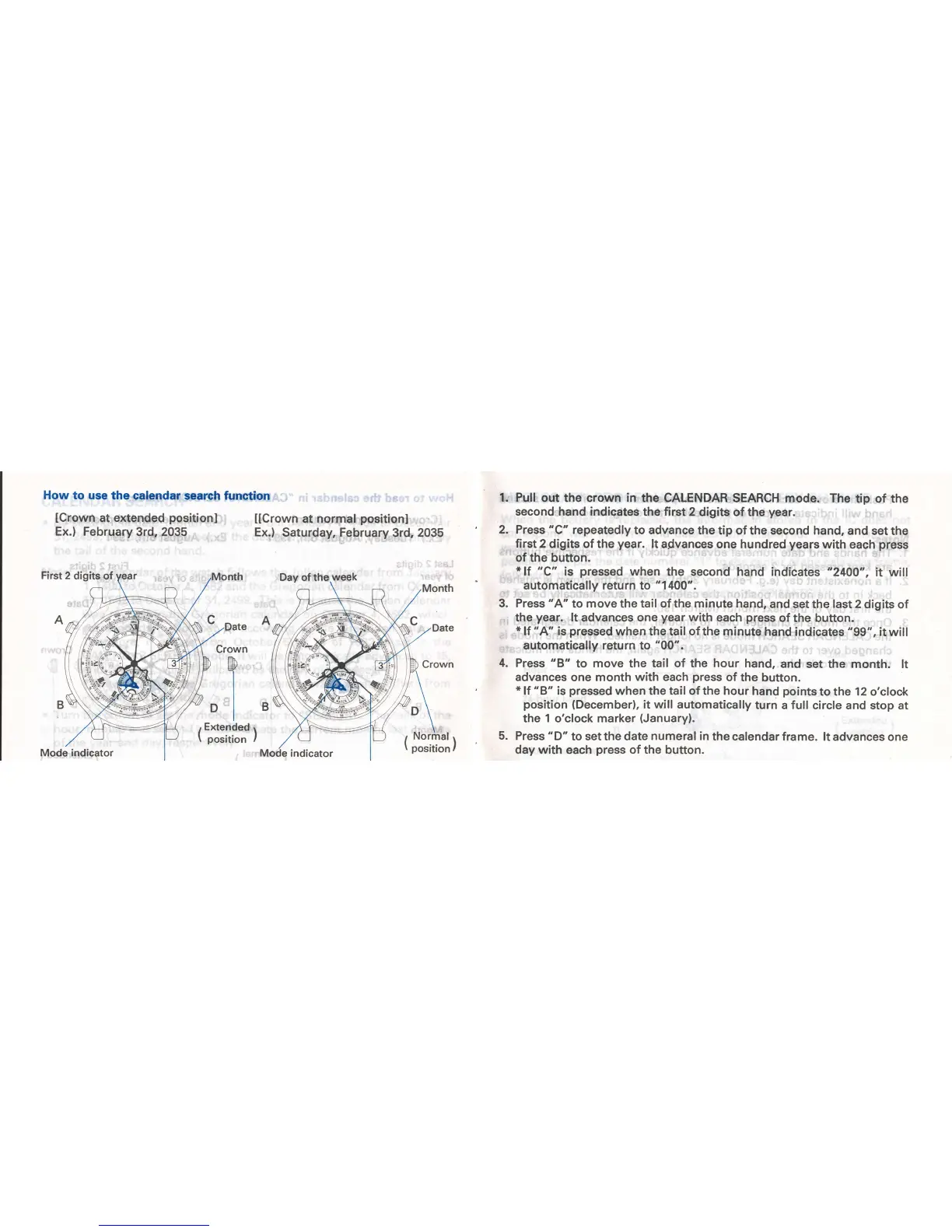
How to
use the calendar
search
funstion
lCrown
at
extended
positionl
Ex.) February
3rd, 2035
First 2
digits of
[[Crown
at normal
positionl
Ex.)
Saturday, February
3rd,
2035
1.
2.
3.
4.
Pull
out the crown in
the CALENDAR SEARCH
mode. The
tip of the
second hand indicates
the first 2
digits of the
year.
Press "C" repeatedly
to advance
the tip of the second hand,
and
set the
first 2
digits of the
year.
lt advances
one hundred
years
with each
press
of the button.
*lf
uC"
is
pressed
when
the second
hand indicates
"2400u,
it will
automatically return to
"1400".
Press "A"
to
move
the tail of the
minute
hand,
and
set the
last
2 digits
of
the
year.
lt
advances
one
year
with each
press
of the button.
*
,f
'
A" is
pressed
when
the
tail
of the
minute
hand indicates
"99",
it
will
automatically return to
"00".
Press
"8"
to
move the tail of the
hour
hand,
and set the
month. lt
advances
one
month
with
each
press
of
the
button.
*
lt
'B'
is
pressed
when the tail of the hour
hand
points
to the 12 o'clock
position
{December),
it
will
automatically
turn
a
full
circle and stop at
the 1 o'clock marker
(January).
Press
"D"
to set the
date numeral in
the
calendar frame. lt advances
one
day with
each
press
of the
button.
5.
Mode
indicator

Related product manuals