EasyManua.ls Logo

Seiko 6M13 - ONE-DAY ALARM;DAILY ALARM Modes; Adjusting the Hand and Date Positions

Seiko 6M13
20 pages
Print Icon
To Next Page IconTo Next Page
To Previous Page IconTo Previous Page
Loading...
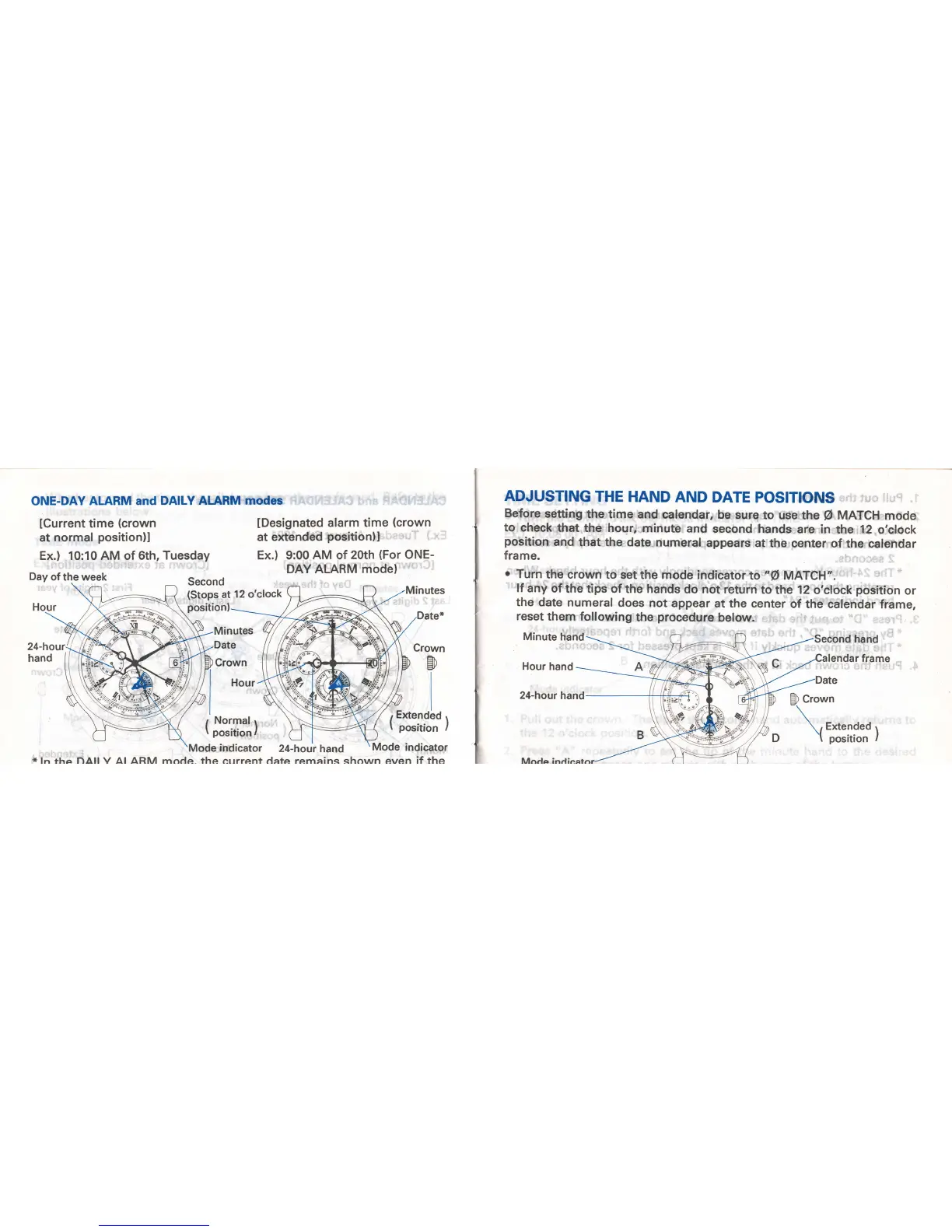
ONE-DAY ALARM
and DAILY
AIARM modes
lCurrent
time
(crown
at normal
position)l
Ex.) 10:10 AM of
6th, Tuesday
Day
of
the
week
Second
(Stops
at
12 o'clock
position
lDesignated
alarm time
(crown
at e)dended
positionll
Ex.) 9:00 AM of
20th
(For
ONE-
DAY ALARM mode)
Crown
er
Ef
r
Normal
.
I
position
I
'l*r[,
Mode indicator
24_hour hand
\Mode
indicator
*
ln fha nAll V Al ARM rnnda the errrrenf data rernainq shorrun even if the
ADJUSTING
THE
HAND
AND
DATE
POSITIONS
Before
setting
the time
and
calendar, be
sure
to use
the
O
MATCH
mode
to
check
that the hour,
.minute
and
second
hands
are in
the 12 o,clock
position
and
that the
date numeral
appears at
the
center of
the calendar
frame.
o
Turn
the
crown to
set
the mode indicator
to "O MATCH'.
lf
any
of the
tips of
the hands
do not'return
to
the 12
o'clock
position
or
the
date numeral
does not
appear
at
the center
of the calendar
frame,
reset
them following
the
procedure
below.
Minute hand
Second hand
lendar frame
Hour
hand
24-hour
hand

Related product manuals