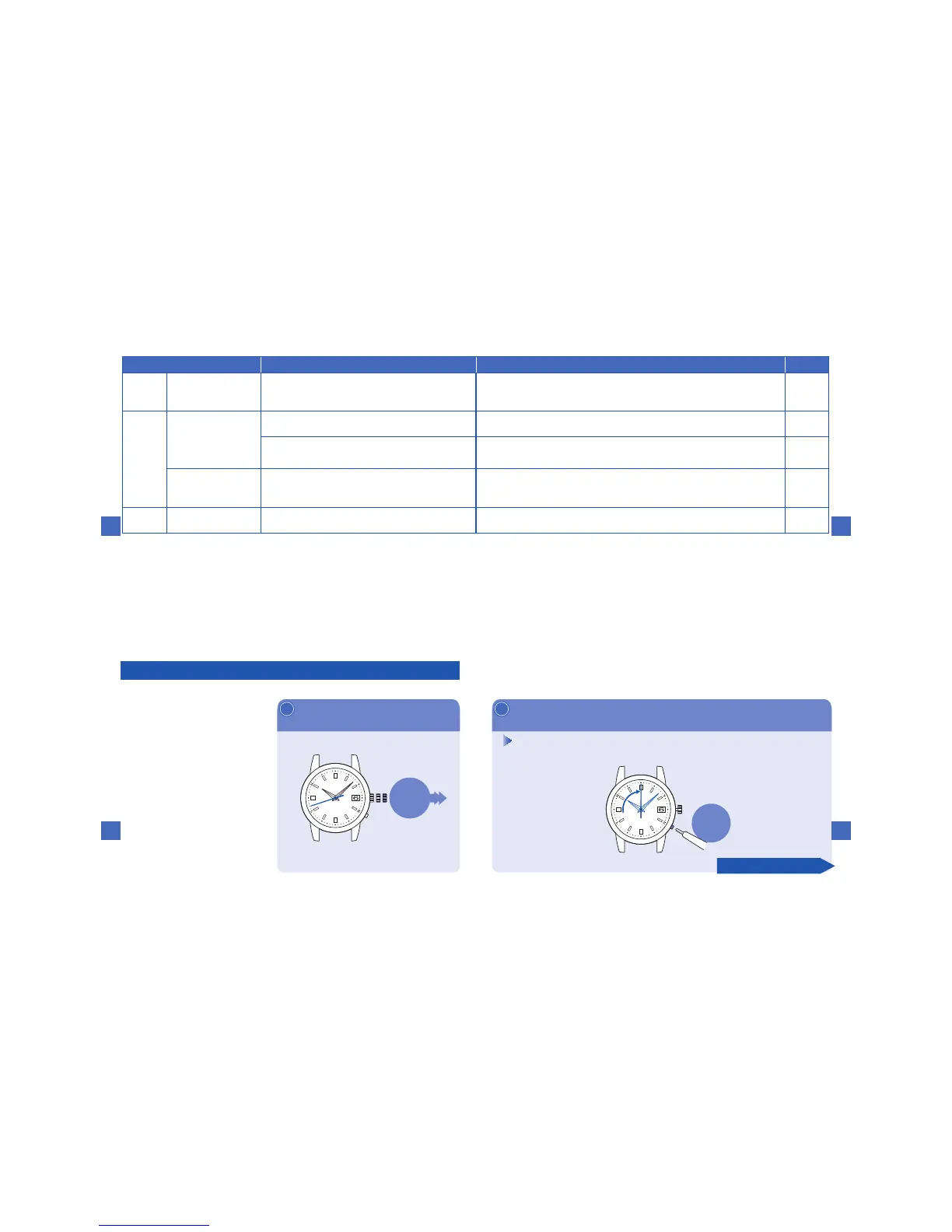
Pressthebuttonfor5secondsandthenreleaseit
2
※Pressthe
buttonwitha
pointedobject.
→P.96
※Thebuttoncannotbeoperated
untilallthehandsstop.
Infivesecondsafterreleasingthebutton,thehourhandstartstomove
andstopsatthe12o'cloc kposition.Andthentheminutehandandthe
secondhandstarttomoveandstopatthezerosecondposition.
Pressing
thebuttonfor
5secondsand
release
Continuetothenextpage
Troubleshooting
7
159
Incasethatthewatchmoves
abnormallyorthatthe watch
doesnotmoveatone-second
intervalseven afterfully
chargingthebattery,perform
theproceduresfrom①-⑦for
normalfunction.
■Resetthesystem( ①-② )
Pullthecrowntothesecond
click
1
※ Even after pullingthe crown, the second
handcontinuestomove.
Incaseofanabnormalmovement
0 1 2
Pulling
thecrownto
thesecond
click
※Whenthecrownis
ascrewlocktype,
unlockit.→P.97
Troubleshooting
7
158
Solution
Referencepages
Setthedatetothepreliminaryposition1(the1st).
P.160
Sufficiently charge the watchuntil it startsmoving atone-second
intervals.
P.112
Waitwithoutdoinganything.
Afterthedatestops,thecrownandbuttonscanbeoperated.
−
1.Ifthecrownispulledout,pushitbackin.
2.
Thewatchwillresumeitsnormalone-secondintervalmovementswithin5minutes.
3.Startthesettingprocedurefromthebeginning.
−
Contacttheretailerfromwhomthewatchwaspurchased. −
Attrouble Possiblecause
Misalignment
ofthedate
Thereception results are successful
andthe precise timeisdisplayed, but
thedateisnotcorrectlydisplayed.
Thedateisoutofthepreliminaryposition.
Thishappenswhenthedateisoutofthepreliminarypositionasaresult
ofinfluenceofvariousexternalsourcesorafterthebuilt-inICisreset.
Operation
Thecrownorbuttons
cannotbeoperated.
Thestoredelectricpowerisrunningshort.
Handsanddatearemovingrightafterasetting
iscarriedoutbythecrownorbuttonoperation.
Yougetlostin
themiddleofthe
operation.
−−−−−−−−−−−−−−−−−−−−−−−−
Others
Bluronthedialglass
persists.
Smallamountofwaterhasgotinsidethewatch
duetodeteriorationofthegasket,etc.
Troubleshooting
7
157
※
Forthesolutionoftroublesotherthantheabove,consulttheretailerfromwhomthewatchwaspurchased.
Solution
Referencepages
Setthedatetothepreliminaryposition1(the1st).
P.160
Sufficiently charge the watchuntil it startsmoving atone-second
intervals.
P.112
Waitwithoutdoinganything.
Afterthedatestops,thecrownandbuttonscanbeoperated.
−
1.Ifthecrownispulledout,pushitbackin.
2.
Thewatchwillresumeitsnormalone-secondintervalmovementswithin5minutes.
3.Startthesettingprocedurefromthebeginning.
−
Contacttheretailerfromwhomthewatchwaspurchased. −
Attrouble Possiblecause
Misalignment
ofthedate
Thereception results are successful
andthe precise timeisdisplayed, but
thedateisnotcorrectlydisplayed.
Thedateisoutofthepreliminaryposition.
Thishappenswhenthedateisoutofthepreliminarypositionasaresult
ofinfluenceofvariousexternalsourcesorafterthebuilt-inICisreset.
Operation
Thecrownorbuttons
cannotbeoperated.
Thestoredelectricpowerisrunningshort.
Handsanddatearemovingrightafterasetting
iscarriedoutbythecrownorbuttonoperation.
Yougetlostin
themiddleofthe
operation.
−−−−−−−−−−−−−−−−−−−−−−−−
Others
Bluronthedialglass
persists.
Smallamountofwaterhasgotinsidethewatch
duetodeteriorationofthegasket,etc.
Troubleshooting
7
156



 To Next Page