分時 秒
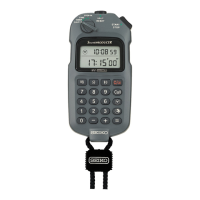
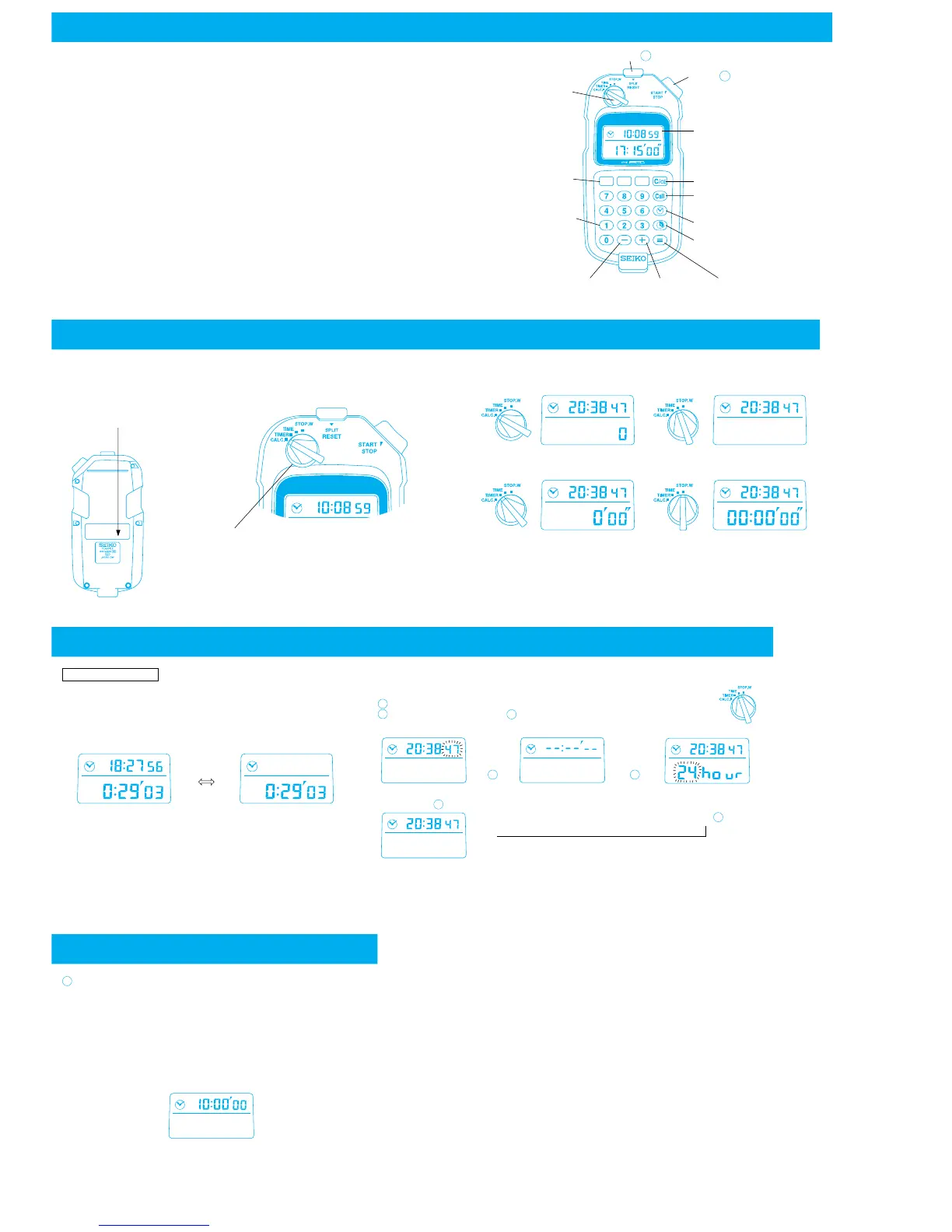
Button A
Mode selector
Hour, minute and
second keys
Number entry keys
(for numerals
from 0 to 9)
Subtraction key
Addition key Equal key
Recall key [Call]
Time display key
Display:
Upper row : Time display
Lower row : Measurement/
calculation data display
Button B
・The SEIKO Cal. S351 features timer and stopwatch functions designed for
broadcasting use.
It is also equipped with a convenient function to calculate times entered in the
sexagesimal form.
1. Addition and subtraction of times can be made simply by entering the hour, minute
and second digits with the number entry and time (hour, minute and second)
keys.
can be used as the starting time in the timer and stopwatch functions.
2. The timer can be set for up to 99 hours, 59 minutes and 59 seconds in one second
increments.
Show the time elapsed from the end of the countdown with “−” sign.
While the timer is counting down, the time elapsed from the start of the count-
down can also be displayed.
3. The stopwatch can measure up to 100 hours in one second increments.
After 100 hours, it will start counting again from “0” repeatedly.
Split time measurement is also possible.
4. Changeover between 12- and 24-hour indications is possible.
5. The watch will not give out any beeping sound such as sound for button operation
confirmation, as it will disturb the broadcast.
Clear/clear entry key
Elapsed time display key
*
y
nt/
・The watch is provided with 4 modes.
・The mode can be changed by turning the mode selector.
Mode selector
Positions of the mode marks for the mode selector
Time calculation mode: [CALC.] Time mode: [TIME]
Stopwatch mode: [STOP-W.]
The timer and stopwatch continue counting even if the mode is changed
to another.
Timer mode: [TIMER]
*The rear center of the
watch is dented so that
a name sticker or the
like can be attached.
■HOW TO SET THE TIME 「TIME」
Current time display
・In the time calculation, timer and stopwatch modes, the
current time can be shown in the upper row of the display as
required. With each press of the time display key, the current
time appears and disappears alternately.
Notes:
・The current time can be displayed in any modes other than
the time.
・Once the current time is displayed in one mode, it will also
be displayed in the other modes.
・In the time mode, the current time is always displayed and
will not disappear even if the time display key is pressed.
〈Current time displayed〉 〈Current time not displayed〉
Ex.)
・Use the number entry and time keys to set the desired time.
・The time you wish to set should be entered in the 24-hour indication.
The entered time, however, can be displayed in the 12-hour indication.
Turn the mode selector to set the knob to “TIME”.
With each press of button , the display changes as follows:
Even while the display changes, the watch continues operating normally.
→
→
〈Second setting display〉*〈Time setting display〉*〈Changeover between 12-
and 24-hour indications〉
→
〈Time display〉
Note: If the watch is left untouched with the second digits flashing or with “--:-- --” or
“24 hour” displayed, the display will automatically return to the TIME in 1 to 2
minutes.
Time display
key
↑
↓
A
1
2
A
A
A
A
3
In the time setting display, set the desired time using the
number entry and time keys.
Ex.) To set 10:00 a.m.:
[1] [0] [時 (HOUR)] [0] [分 (MINUTE)] [0] [秒 (SECOND)]
Or
[1] [0] [0] [0] [0] [0]
*In the first method, entering the minute and second digits is not
necessary if they are “0”.


 To Next Page
 Loading...