English
English
28 29
IMPROPER FUNCTION
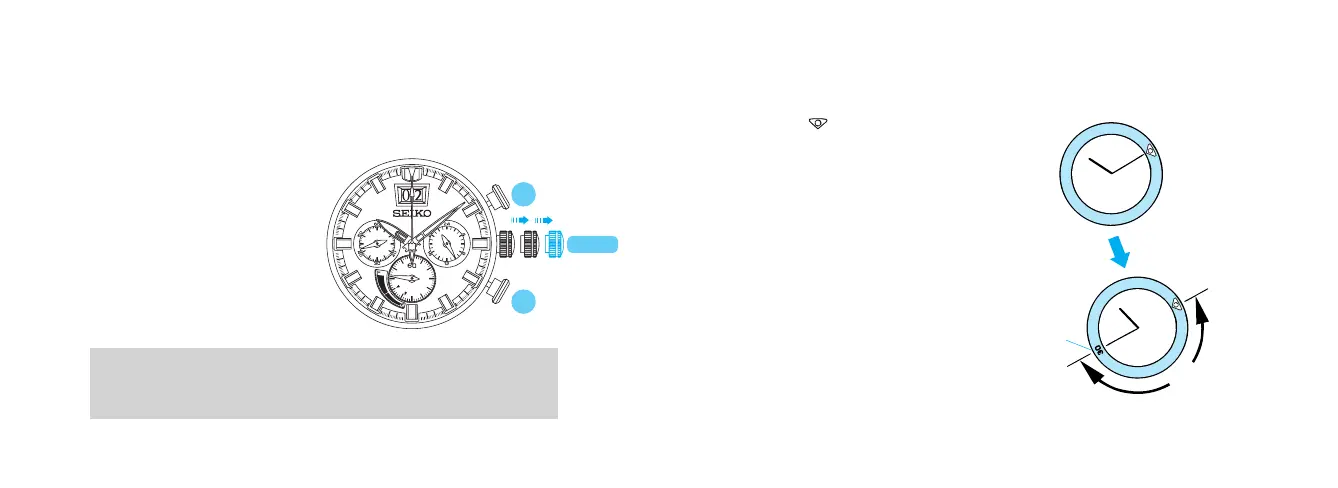
When an abnormal display appears, follow the procedures below to reset the
built-in IC. The watch will resume its normal operation.
<HOW TO RESET THE IC>
1. Pull out the crown to the
second click.
2. Keep pressing down Button A
and B for 3 seconds or longer.
3. Push the crown back into the
normal position and check if
the small second hand moves
as normal.
B
A
CROWN
Resetting the IC will initialize the watch. Before starting to use the watch, it will
be necessary to set the time and adjust the STOPWATCH hands to the 0 position.
Refer to “TIME SETTING AND HAND POSITION ADJUSTMENT” (P.11) section of
this manual.
ROTATING BEZEL
(for models with rotating bezel)
l
The rotating bezel can show up to 60 minutes of elapsed time.
1 Turn the rotating bezel to align
its "
" mark with the minute
hand.
Note: For some models, the rotating bezel rotates only counterclockwise.
Start
Elapsed time
2 Read the number on the rotating
bezel that the minute hand points to.
30 minutes
have elapsed.


 To Next Page