English
English
12 13
l
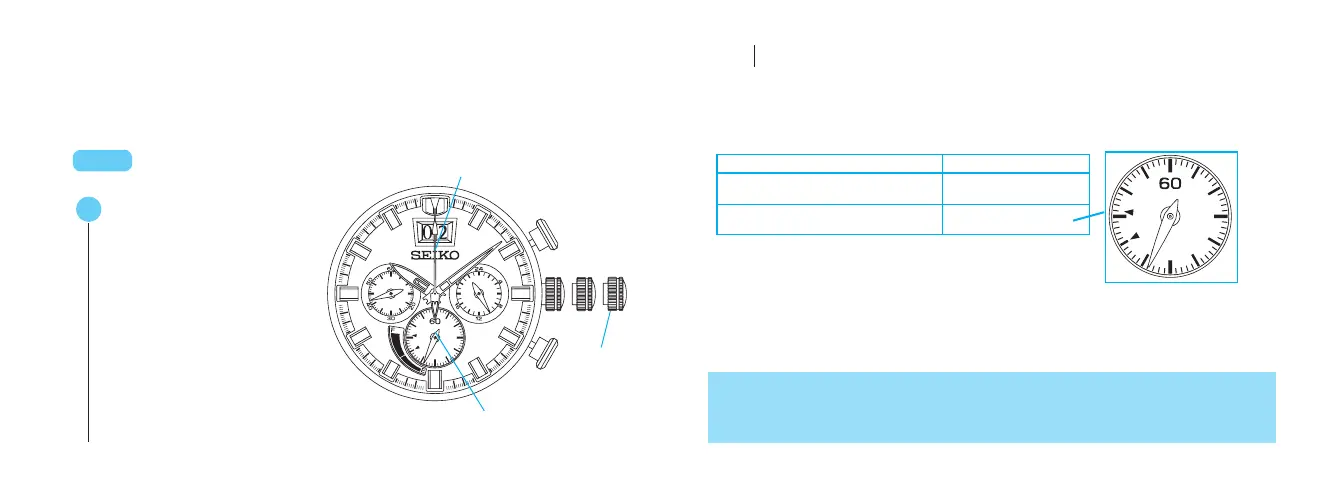
How to check the position of the hands
◆
Check that the second hand moves at normal one-second intervals when the crown
is at the normal position. When the watch is stopped or the second hand is moving
at 2-second intervals, charge the watch by exposing it to light. See “HOW TO
CHARGE AND START THE WATCH.” (P.21)
Pull out to the second
click.
t
CROWN
A
Press for 2 seconds or longer.
The STOPWATCH 1/5-second
hand and power reserve
indicator move to the
preliminary position.
The watch is now in the hand
position adjustment mode.
Second
click
Name of hand Preliminary position
STOPWATCH 1/5-second hand 0 second position
Power reserve indicator
(STOPWATCH minute hand)
Low level
Check that the position of each hand is
at the preliminary position by referring
to the table below.
t
•
If the crown is pulled out while the stopwatch is counting, the stopwatch will be automatically
reset.
• This operation can be performed both in the POWER RESERVE DISPLAY mode and the
STOPWATCH mode.
◆
If any hand is not correctly positioned, adjust it by carrying out the procedure on the
following page.
◆
When all hands are correctly positioned, move on to the procedure for “Time
setting for main dial.” (P.15)
▲
STOPWATCH 1/5-second hand
Power reserve indicator


 To Next Page