3
TDST24M000SE 032635 190619
TO INSTALL THE DEVICE, PERFORM THE
FOLLOWING OPERATIONS:
1
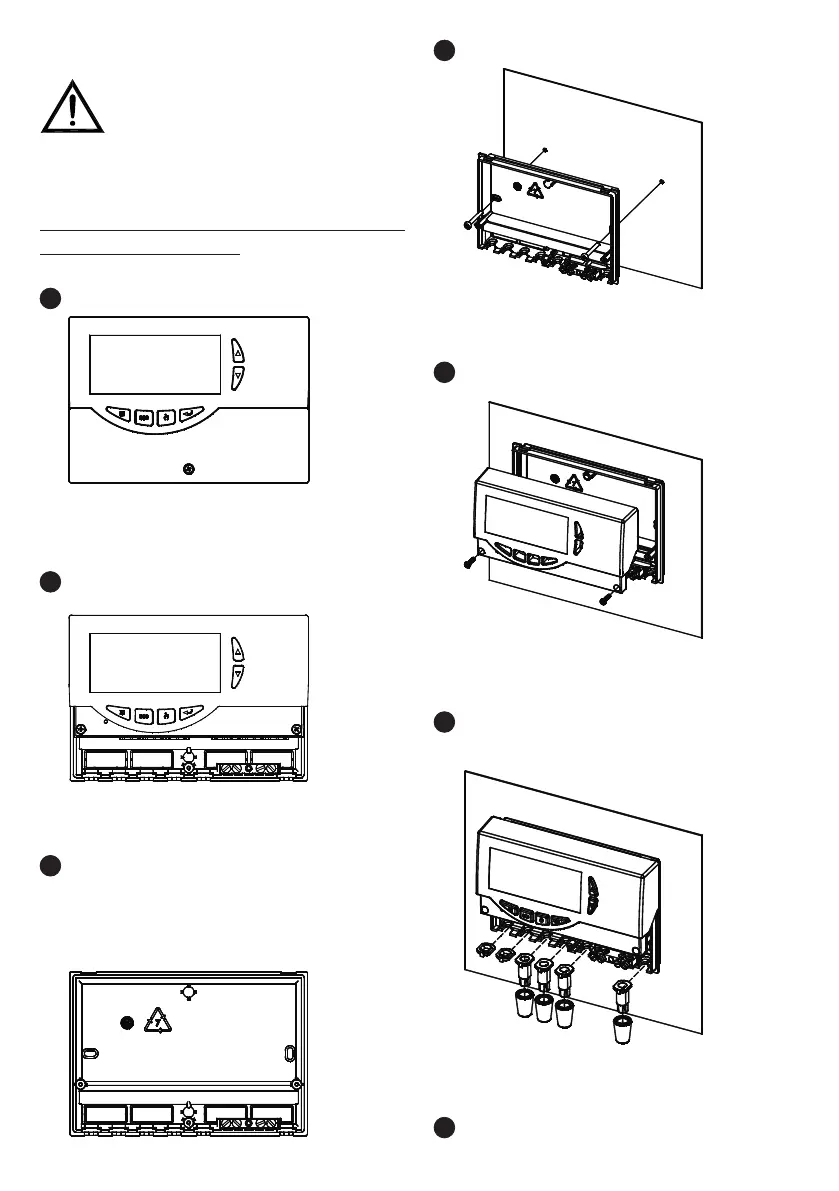
Remove the central screw and the plastic door.
4
Fix the power unit base to the wall.
3
ASSEMBLY WITH CABLE INPUT ON THE REAR PANEL:
if the cable fasteners (delivered with the unit) are not
required for installation, use a screwdriver to remove
the base blocks permitting the cables to pass through,
and t the blocks delivered (6).
INSTALLATION
2
Remove the two screws shown in the drawing, then
remove the whole body from the base.
5
Fit the cover again with the electronics at the base.
6
ASSEMBLY WITH CABLE INPUT ON THE LOWER SIDE:
t the cable fasteners and/or the blocks delivered with
the unit.
7
Make the electrical connections according to the
following layout and the examples on page 4 and 5.
WARNING!
The installation technician shall operate in full
compliance with all the applicable technical standards
in order to grant the unit safety


 To Next Page