17
www.selema.it
Service Manual
DC 4Q A Series
t's possible to enable clockwise (CW) and counter-clockwise (CCW) motor rotation by connecting
the +L.SW and -L.SW inputs.
They may be used to block motor rotation when the machines overflow contact is intercepted.
The Enable input in regards to this input always has priority. To enable such a function, you
must:
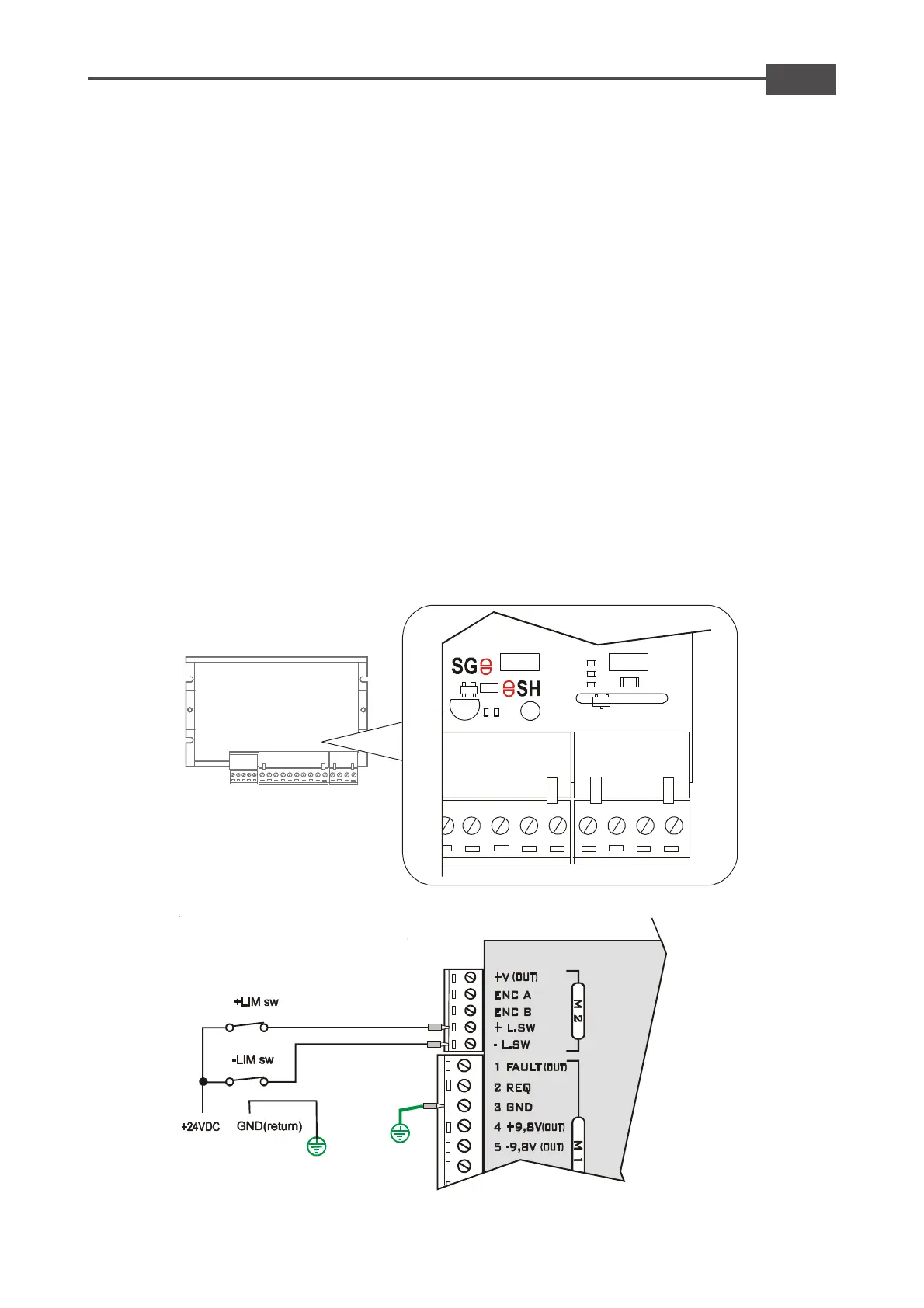
-- Open soldiering point SG and SH (see figure 1)
-- Then connect on said input a positive voltage (between +5Vdc and + 24Vdc) coming from -for
example two N.C. contacts (see figure 2 or 3)
Function: At opening one of the following contacts you enable the motor rotation in the
corresponding direction.
2.10 Limit switch inputs
Note:
- This Drive is factory set with the SG and SH solder bridge close
- DON'T connect any voltage in the +L.SW and -L.SW inputs if the soldiering point SG and SH are
closed
- When one of these said contacts is intercepted the motor stops with the required inertia.
Fig. 1
Fig. 2
Example with external positive voltage
(between +5Vdc and +24Vdc)



 To Next Page