SAE
fon
- operating instructions 75
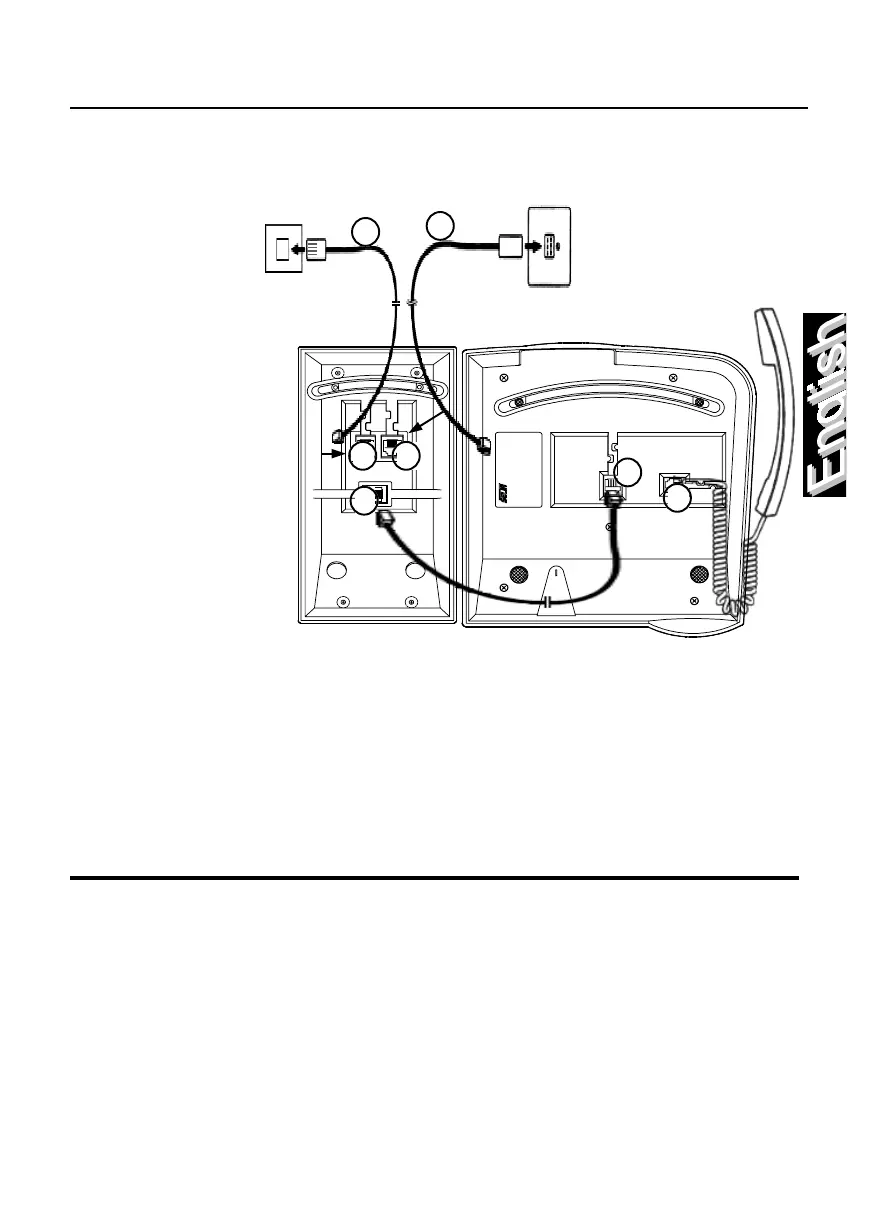
Connect the
handset first, by
inserting the
straight end of the
spiral connecting
cable into the
lateral socket on
the base of the
telephone
(1)
; insert
the other end of this
cable into the
handset.
Connect the K module
to the telephone by
inserting the connector
on the telephone
connecting cable into
the central socket on
the base of the K
module
(2)
; insert the other
end of this cable on the base of the telephone
(3)
.
Now connect the K module by inserting the connector on the telephone
connecting cable in the left socket on the base of the K module (6 pin)
(4)
; insert
the other end of this cable into the telephone wall socket
(5)
.
To connect a data terminal, insert the connector on the data connecting cable
into the right socket on the base of the K module (8 pin)
(6)
; insert the other end
of this cable with either the port on a P.C. or an external terminal
(7)
.
By gently pulling, check that the cables connectors are in place.
Connectings SAEfon TK
Labelling the freely-programmable keys
Alongside the freely-programmable keys, there is a removable identification
label. Define the identifies for each af the programmable keys. Finally replace
the trasparent cover over the label.
1
2
3
4
5
6
7



 To Next Page