The Sena 20S EVO is a Bluetooth communication system designed for motorcycle helmets, offering a comprehensive suite of features for communication, entertainment, and navigation. This quick start guide outlines its primary functions, usage, and basic maintenance.
Function Description
The 20S EVO serves as a multi-functional communication hub, integrating:
- Intercom: Facilitates communication between multiple riders, supporting both quick pairing for two riders and normal pairing for up to nine friends. It also includes a group intercom feature.
- Mobile Phone Connectivity: Allows users to answer, end, reject, and transfer calls, as well as activate voice dialling.
- Music Playback: Enables streaming and control of music from a connected device.
- FM Radio: Features an integrated FM radio with station seeking, scanning, and preset saving/deleting capabilities.
- GPS Navigation: Can connect to GPS devices for turn-by-turn directions.
- Ambient Mode: A unique feature that allows the user to hear surrounding sounds without removing the helmet, enhancing situational awareness.
- Voice Commands: Offers hands-free control over various functions using predefined voice commands.
Important Technical Specifications
While specific technical specifications like battery capacity or Bluetooth version are not detailed in this quick start guide, the device's functionality implies:
- Bluetooth Connectivity: Essential for pairing with phones, MP3 players, GPS devices, and other Sena units for intercom.
- Rechargeable Battery: Indicated by the "DC Power Charging & Firmware Upgrade Port."
- Microphone and Speakers: Integrated for communication and audio output.
- Jog Dial and Buttons: Primary user interface for control.
- Status LED: Provides visual feedback on the device's operational status, battery level, and pairing modes.
Usage Features
The 20S EVO is designed for intuitive operation through a combination of a Jog Dial, Phone Button, and Ambient Mode Button, complemented by voice commands.
Installation:
- The device is mounted on the side of the helmet.
- The microphone is positioned inside the helmet, near the user's mouth.
Basic Operation:
- Power On/Off: Press the Phone Button and Jog Dial simultaneously for 1 second to power on, or for 5 seconds to power off.
- Volume Adjustment: Rotate the Jog Dial up or down.
- Button Operation:
- Tap: A quick press.
- Double Tap: Two quick presses.
- Press for 1 sec: Hold the button for one second.
- Press for 6 sec: Hold the button for six seconds.
- Press for 12 sec: Hold the button for twelve seconds.
- Press and Hold: Continuous pressure.
Intercom:
- Quick Pairing: Shake both headsets simultaneously to pair two riders.
- Normal Pairing: Tap the Jog Dial for 1st friend, double tap for 2nd friend, and so on. Confirm pairing for 3rd-9th friends.
- Group Intercom: Press the Ambient Mode Button for 1 second to start or end.
Mobile Phone:
- Answer/End Call: Tap the Phone Button.
- Reject Call: Press the Jog Dial for 2 seconds.
- Voice Dial: Tap the Phone Button.
- Speed Dial: Double tap the Phone Button.
- Call Transfer: Press the Phone Button for 2 seconds.
Music:
- Play/Pause: Tap the Jog Dial.
- Track Forward/Backward: Rotate the Jog Dial while pressing.
FM Radio:
- On/Off: Press the Phone Button for 2 seconds.
- Seek Stations: Rotate the Jog Dial while pressing (up/down).
- Scan Up FM Band: Press the Phone Button for 1 second or double tap.
- Save Preset: Tap the Phone Button while scanning.
- Save/Delete Preset: Press the Jog Dial for 2 seconds to save, or tap the Phone Button to delete.
- Move to Preset Station: Tap the Phone Button to cycle through presets.
Ambient Mode:
- Activate/Deactivate: Tap the Ambient Mode Button.
Voice Commands:
- Activate: Tap the Ambient Mode Button or say "Hello Sena."
- Commands include: "Music" (play/pause), "FM radio" (on/off), "Intercom [one, two, ... nine]" (start/end intercom), "Speed dial [one, two, three]" (speed dialing).
Battery Check:
- The Status LED indicates battery level:
- 70-100% (Green)
- 30-70% (Orange)
- 0-30% (Red)
- Access by pressing the Jog Dial for 12 seconds. This menu includes Universal Intercom Pairing.
Maintenance Features
- DC Power Charging & Firmware Upgrade Port: This port serves a dual purpose, allowing the device to be charged and its firmware to be updated, ensuring the device remains current with the latest features and bug fixes.
- Status LED: Provides immediate visual feedback on battery status, which is crucial for timely recharging and preventing unexpected power loss during use.
The Sena 20S EVO is designed to be a robust and user-friendly communication system for motorcyclists, offering a blend of safety, entertainment, and connectivity features. For a complete understanding and advanced features, users are directed to the full manual available on www.sena.com.

 Need help?
 General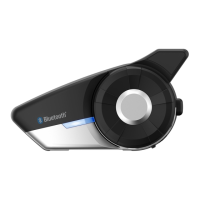

 To Next Page








