QUICK START GUIDE
50S
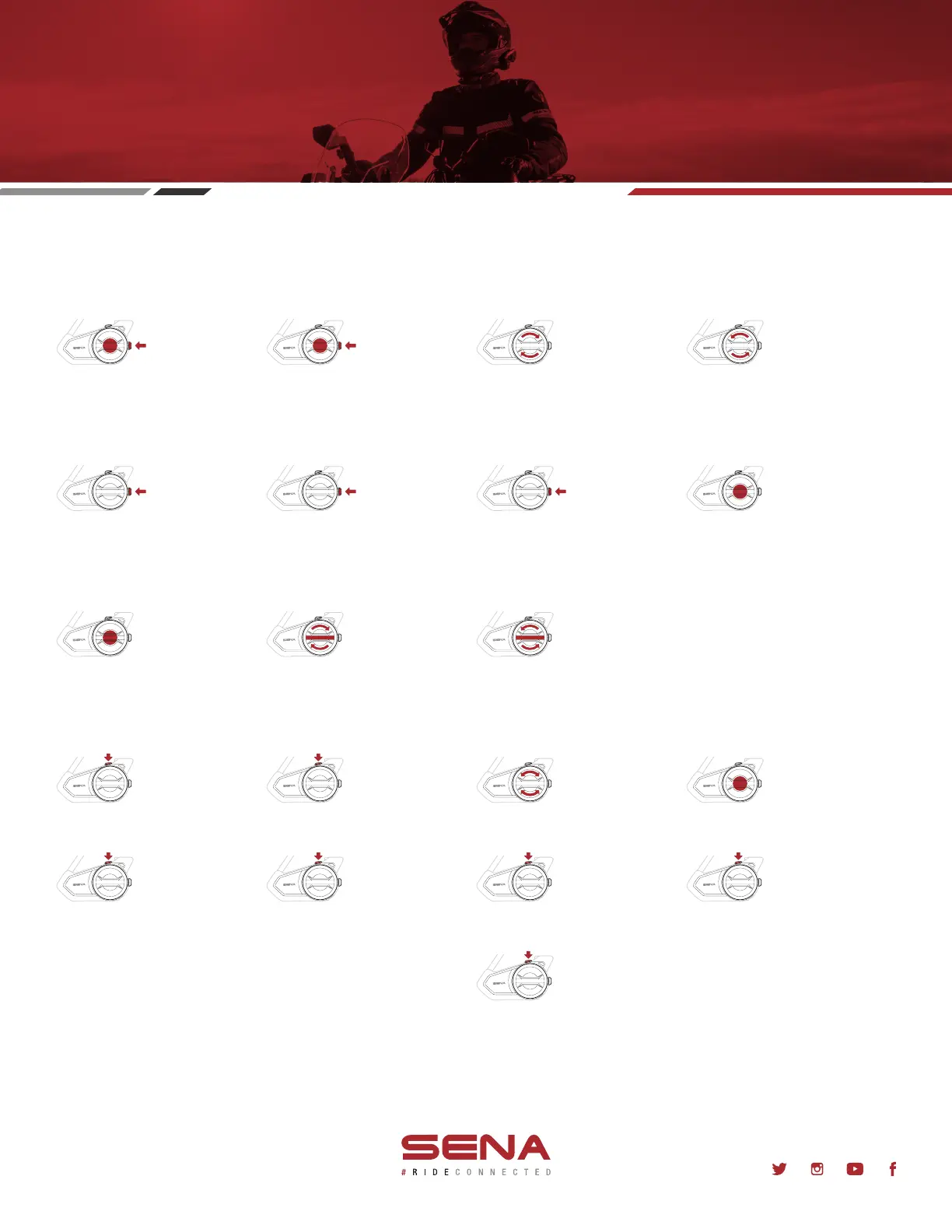
Power on Power off Volume up Volume down
BASIC OPERATIONS
Press and Hold for 1 second 1-Click Rotate Clockwise Rotate Counter-clockwise
Pair to mobile phone Answer phone call End phone call Reject phone call
MOBILE PHONE
Press and Hold for 5 seconds 1-Click 1-Click
Play/Pause music Track forward Track backward
MUSIC
Press and Hold for 1 second Rotate Clockwise While Pressing the Jog Dial Rotate Counter-Clockwise While Pressing the Jog Dial
Press and Hold for 2 seconds
Open Mesh On/Off
Create Group Mesh Enable/Disable MicrophoneJoin Existing Group Mesh Reset Mesh
Toggle Open Mesh/Group Mesh
Enter Channel Selection Navigate Channels Confirm Channel
INTERCOM
1-Click
Press and Hold for 5 seconds Press and Hold for 8 seconds
2-Clicks
Press and Hold for 5 seconds
Rotate Clockwise or Counter-Clockwise
Press and Hold for 1 second
1-Click
Press and Hold for 3 seconds
Learn more at
Sena.com/product/50s
@SenaBluetooth
Note:
•
This action enters Mesh Grouping mode
•
Creating a Group Mesh requires a minimum of
two Open Mesh users
•
Each Open Mesh user must perform the above
action within 30 seconds of each other to create
the Group Mesh
Note:
•
This action enters Mesh Grouping mode
•
Joining an existing Group Mesh requires one
current Group Mesh user and at least one Open
Mesh user
•
A current Group Mesh user must perform the
above action to allow an Open Mesh user to join
•
An Open Mesh user must perform the above
action while in any Open Mesh channel within
30 seconds of the Group Mesh member
allowing another user to join



 To Previous Page