30
MENU
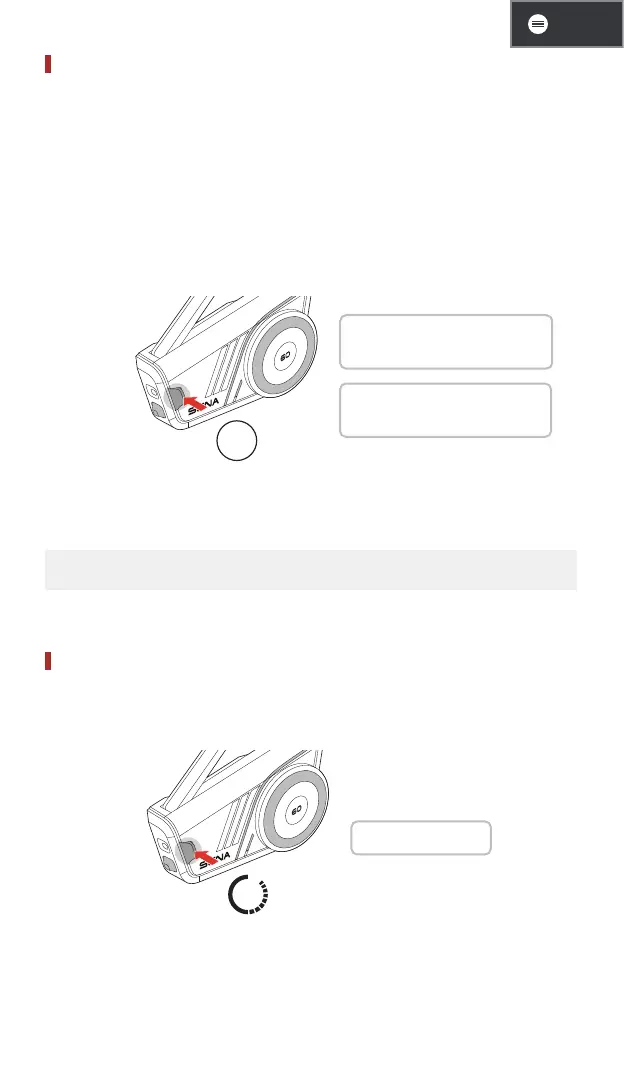
Mesh Reach-Out Request
You (caller) can send a Mesh Reach-Out request to turn on Mesh
Intercom to nearby* friends who have it turned off.
1. If you want to send or receive a Mesh Reach-Out request, you
need to enable it in the Sena Motorcycles app.
2. You can send a Mesh Reach-Out request using the Mesh
Intercom button or the Sena Motorcycles app.
Caller
3x
1 Caller: "Mesh reach-out
request"
1 Nearby Friends: "Mesh
intercom requested"
3. Friends who receive the Mesh Reach-Out request need to
manually turn on their Mesh Intercom.
* Up to 330 ft in open terrain
Reset Mesh
If the 60S resets the mesh while in open mesh or group mesh, it will
automatically return to open mesh, channel 1.
8s
1 "Reset Mesh"


 To Next Page