29
MENU
2. When mesh grouping is completed, the other users, C and D,
automatically join the group mesh while leaving the open mesh.
1 "Group Mesh"
New participants (C and D)
• If the mesh grouping is not successfully completed within 30
seconds, the current user (You) will hear a low tone double beep
and the new users (C and D) will hear a voice prompt saying,
“Grouping failed.”
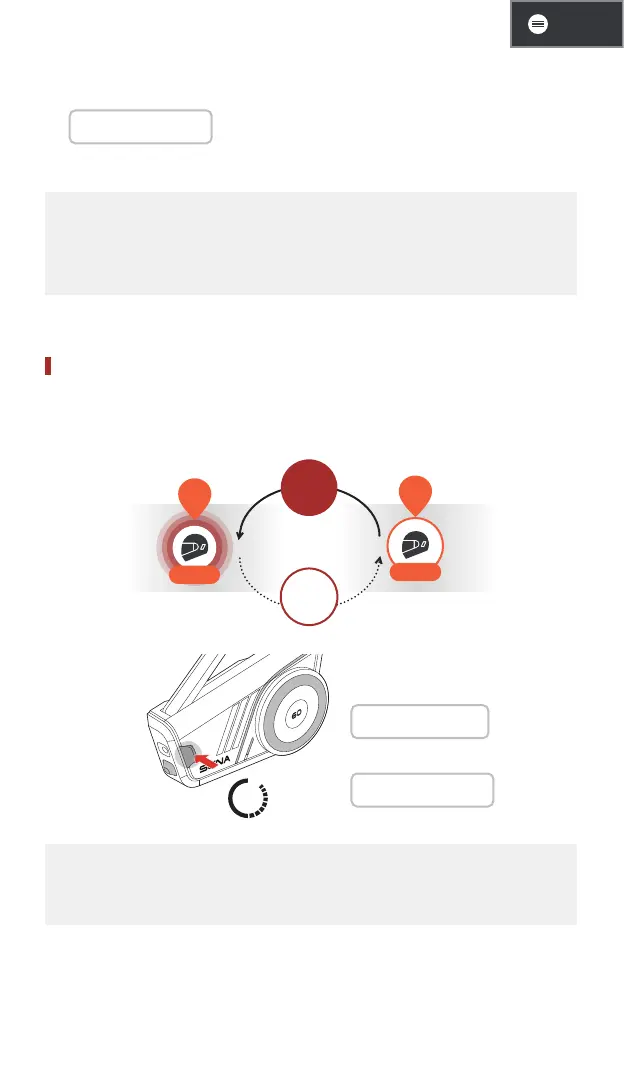
Toggle Open/Group Mesh
You can toggle between open mesh and group mesh without resetting
the mesh.
YOU
Group
Group
Mesh
Open
Mesh
YOU
CH
3s
Open mesh
1 "Open Mesh"
Group mesh
1 "Group Mesh"
• If you have never participated in group mesh, you cannot toggle
between open mesh and group mesh. You will hear a voice prompt
saying, “No group available.”


 To Next Page