Need help?
Do you have a question about the Sena NAUTITALK Bosun and is the answer not in the manual?
Lists key features including IP67 rating, mesh intercom range, noise control, Bluetooth 5.2, and app integration.
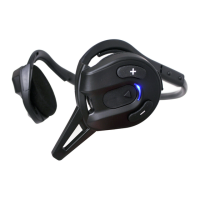
Details the physical components of the headset, including buttons, status LED, and charging port.
Details all items included in the product packaging, such as the headset, microphone sponges, and cables.
Provides instructions on how to correctly wear the headset using the included headband strap for adjustment.
Instructions on how to charge the headset, including notes on recommended practices and charger compatibility.
Explains the meaning of symbols used in the manual, such as tap and hold functions, and audible prompts.
Details the procedure for turning the headset on and off using button presses.
Guides users through the Bluetooth pairing process to connect the headset with a smartphone.
Explains how to answer, end, reject calls, and activate the voice assistant.
Covers assigning and using speed dial presets for quick calling via the Sena Marine App or headset.
Provides instructions for playing, pausing, and controlling music tracks on the headset.
Explains the Mesh Intercom system, highlighting its group communication capabilities and channel availability.
Details the steps to turn the Mesh Intercom feature on and off, including status indicators.
Guides users on how to change the Mesh Intercom channel to avoid interference and improve communication.
Explains how to mute or unmute the microphone during a Mesh Intercom conversation.
Describes how to send and receive Mesh Intercom connection requests to nearby users.
Explains how to change various headset settings, such as language and voice prompts, via the Sena Marine App.
Details how to select or change the device language, which remains saved after rebooting.
Explains the Mesh Reach-Out setting and its impact on sending/receiving request messages.
Describes how to adjust Mesh Intercom voice sensitivity across five levels for optimal voice transmission.
Lists the voice prompts that remain active even when other prompts are disabled in settings.
Provides instructions on updating the headset firmware wirelessly using the Sena Marine App.
Explains how to reset the headset to its original factory default settings by holding the multi-function button.
Describes the process of fault resetting the unit by connecting the USB power cable to resolve operational issues.
The Sena Nautitalk Bosun is a yachting headset designed for crew communication, offering a blend of robust features for marine environments. This device facilitates seamless communication among crew members and integrates with smartphones for various functions.
The primary function of the Nautitalk Bosun is to provide reliable crew communication through its Mesh Intercom™ system. This system allows for effortless communication among an unlimited number of users within a range of up to 0.8 km (0.5 mi) in open terrain, without the need for a pre-grouping process. Users can communicate across 9 available channels, and the device includes an "Advanced Noise Control™" feature to ensure clear audio even in noisy marine settings.
Beyond intercom, the Nautitalk Bosun offers comprehensive smartphone integration via Bluetooth® 5.2. This enables users to pair their headset with a smartphone to make and answer calls, manage speed dial presets, and listen to music. The device supports multipoint pairing, allowing connection to two phones simultaneously. A voice assistant can also be activated through the headset for hands-free control.
The Nautitalk Bosun is designed for intuitive operation with a combination of physical buttons and audible prompts.
To power on the headset, the Multi-function Button needs to be held for 1 second. Powering off is achieved by tapping the Multi-function Button once.
Phone pairing is initiated by holding the Multi-function Button for 3 seconds until the "Phone Pairing" prompt is heard and the LED blinks. Once paired, calls can be answered with a single tap of the Multi-function Button and ended or rejected by holding the Multi-function Button for 2 seconds. A voice assistant can be activated with a single tap of the Multi-function Button while in standby mode.
The headset supports speed dialing, with presets assignable via the Sena Marine App. To use speed dial, hold the (+) Button for 3 seconds until "Speed dial" is heard. Users can then navigate through presets using the (+) or (-) Buttons and confirm their selection with a tap of the Multi-function Button.
Music playback is straightforward. To play or pause music, hold the Multi-function Button for 1 second. Tracks can be skipped forward or backward by holding the (+) Button or (-) Button for 1 second, respectively.
Starting Mesh Intercom involves tapping the Mesh Intercom Button once, which will prompt "Mesh intercom on, channel 1." To turn it off, tap the Mesh Intercom Button once again, and the prompt "Mesh intercom off" will be heard.
If interference occurs on the current Mesh Intercom channel, users can change it. This is done by double-tapping the Mesh Intercom Button to enter channel setting mode. Channels can be navigated using the (+) or (-) Buttons, and the selection is saved by tapping the Multi-function Button. The device will automatically save the channel after approximately 10 seconds if no other buttons are pressed.
The microphone can be muted or unmuted in any Mesh channel by holding the Mesh Intercom Button for 1 second.
The Nautitalk Bosun includes a Mesh Reach-Out feature, which allows users to request nearby friends to turn on Mesh Intercom. This feature must be enabled through the Sena Marine App. To send a request, while Mesh Intercom is on, triple-tap the Mesh Intercom Button. The caller will hear "Mesh reach-out request," and nearby friends will hear "Mesh intercom requested." This feature has a range of up to 100 m (109 yds) in open terrain.
Volume adjustments are made by tapping the (+) Button for volume up and the (-) Button for volume down.
The headset is designed to be worn with a headband strap, which can be adjusted for length to ensure comfort and reduce stress on the ears.
The Nautitalk Bosun offers several features to ensure its longevity and optimal performance.
The headset is charged via a magnetic USB-C power cable. It is recommended to remove the headset before charging, as it will automatically turn off during the process. The device is compatible with 3rd party USB chargers approved by regulatory bodies like FCC, CE, or IC.
Firmware updates are managed wirelessly through the Over-The-Air (OTA) Firmware Update feature available in the Sena Marine App. It is crucial not to turn off the headset during an update to prevent damage.
Various configuration settings, such as headset language, Mesh Reach-Out enablement, Mesh Intercom Vox Sensitivity, and Voice Prompt settings, can be adjusted through the Sena Marine App. The Mesh Intercom Vox Sensitivity, for instance, offers 5 levels, allowing users to control how loud they need to speak to activate voice transmission. While some voice prompts can be disabled, essential prompts like battery level, speed dial, and Mesh Intercom will always remain active.
For general troubleshooting information, users can visit sena.com. The device also includes two reset functions:
The Nautitalk Bosun is designed to be robust for marine use, featuring a floating and waterproof (IP67) design. This ensures the headset can withstand exposure to water and will float if dropped, especially when the optional Floating Marker Buoy is attached.
 General
| Operating Temperature | -20°C to 60°C (-4°F to 140°F) |
|---|---|
| Water Resistant | Yes |
| Audio Multitasking | Yes |
| Bluetooth | Yes |
| Operating Distance | Up to 1.6 km (1 mile) |
| Charging Time | 2.5 hours |
| Intercom | Yes |
| Range | Up to 1.6 km (1 mile) |
| Battery Life | Up to 10 hours |
| Waterproof Rating | IPX7 |
| Compatibility | Bluetooth-enabled devices |

 To Next Page