The Sena PowerPro Mount is a versatile accessory designed to securely hold and charge mobile devices, particularly in outdoor or on-the-go environments. It consists of a PowerPro Mount unit, a Handlebar Mount, and a USB Power Cable.
Function Description
The primary function of the PowerPro Mount is to provide a stable mounting solution for smartphones and other compatible devices, while simultaneously acting as a portable power bank. It integrates a high-capacity battery to charge devices via its USB output port. The mount is designed for easy installation on handlebars, making it suitable for motorcycles, bicycles, or similar applications. An LED indicator provides visual feedback on the battery status and charging activity. The device features both a Micro USB input port for charging its internal battery and a standard USB output port for charging external devices.
Important Technical Specifications
- Rating: 3.63V / 10000mAh
- Battery Capacity: 10000mAh
- Charging Voltage (Input): 5V
- Charging Current (Input): 2A
- End Voltage (Input): 5V
- Discharging Current (Output): 2000mA
- Input: 5V / 2A
- Output: 5V / 2A
- Operating Temperature: 10 °C ~ 45 °C (50 °F ~ 113 °F)
- Weight: 249 g
- Size: 80.8 mm x 122 mm x 62.7 mm
- Charging Time: Approximately 6.5 hours (when using a 2A adapter)
- Safety Features: Overcharging protection, over-discharging protection, temperature protection
Usage Features
- Installation: The PowerPro Mount is designed for straightforward installation. The Handlebar Mount attaches to a handlebar, and the PowerPro Mount unit then secures onto the Handlebar Mount. The device holder is adjustable to accommodate various smartphone sizes.
- Charging the PowerPro Mount: To charge the internal battery of the PowerPro Mount, connect the Micro USB Power Cable to the Micro USB input port and a power source. Press the Power Button to initiate charging. The LED indicator will show the charging progress. A full charge takes approximately 6.5 hours with a standard 2A USB cable.
- Charging External Devices: Connect your device to the USB output port of the PowerPro Mount using a compatible USB cable. The PowerPro Mount is compatible with 5V input USB-charged devices only.
- Battery Level Indication: The LED indicator provides real-time battery status:
- Four solid LEDs: 100%
- Three solid LEDs: 75%
- Two solid LEDs: 50%
- One solid LED: 25%
- No LEDs: 0%
To check the battery level during use, tap the Power Button.
- Release Mechanism: The PowerPro Mount can be easily released from the Handlebar Mount for portability or storage.
Maintenance Features
- Product Storage and Management:
- Keep the product free of dust to prevent damage to mechanical and electronic parts.
- Avoid storing the product in high temperatures, as this can reduce the lifespan of electronic devices, damage the battery, and melt plastic components.
- Avoid storing the product in cold temperatures, as abrupt temperature changes can cause condensation and damage electronic circuits.
- Do not store the product in humid environments for extended periods.
- Cleaning: Do not use cleaning solvents, toxic chemicals, or strong detergents, as these can damage the product.
- Handling:
- Avoid dropping or shocking the product to prevent damage to its internal electronic circuits.
- Do not disassemble, repair, or modify the product, as this will damage the product and invalidate the warranty.
- Do not cause impact to the product or touch it with sharp tools.
- Keep the product dry and away from water.
- Keep the product away from pets or small children.
- Do not use the product near a microwave oven, as this may cause malfunction or interference.
- Do not use the product near hazardous explosives. If explosion hazards are present, unplug the USB cable and follow all safety regulations.
- If the product is damaged, stop using it immediately to prevent further damage, explosion, or fire.
- Battery Care:
- Use an approved charger provided by the manufacturer for recharging the battery. Using a non-approved charger can cause fire, explosion, leakage, and reduce battery life or performance.
- Store the battery at temperatures between 15°C and 25°C (59°F and 77°F). Extreme temperatures (higher or lower) can reduce battery capacity and life, or cause temporary non-operation.
- Do not use the product in sub-zero temperatures, as this can severely reduce battery performance.
- Do not apply heat to the battery or throw it into fire, as it may explode.
- Never use a damaged charger.

 Need help?
 General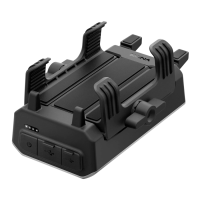

 To Next Page









