63
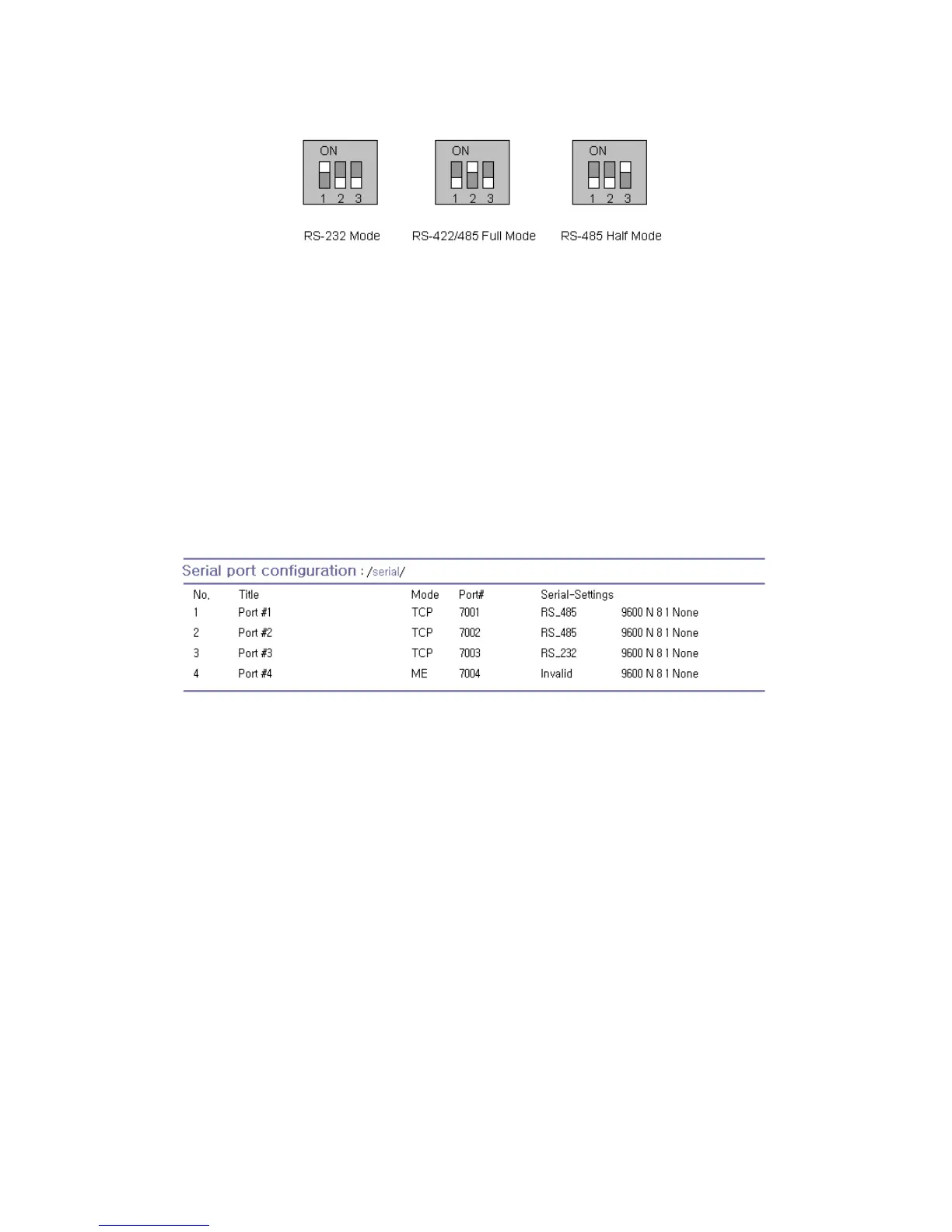
Figure 4-14 Serial communication type and DIP switch configuration. (PS110/410)
For more information about pin out of serial port and wiring diagram, please refer to Appendix 1.
Connections section.
Note:
1. Please turn off the power of the Pro Series device before changing the position of DIP switch in
case of PS110/410. Changing the position of DIP switch while the power is on may cause
damage to the device.
(If the DIP switches are set incorrectly, the PS110/410 will display “Invalid” for the UART type on
the UI as shown on Figure 4-15, which will hinder communications to the serial port.)
2. In case of PS810, UART type can be changed by software through configuration only. So
PS810 does not have a DIP switch for changing UART type.
Figure 4-15 Invalid UART type settings displayed on the Serial port configuration main screen
Baud rate
The valid baud rate for the Pro Series is as follows:
75, 150, 200, 300, 600, 1200, 2400, 4800, 9600, 19200, 38400, 57600, 115200, and 230400
The factory default setting is 9600.
Data bits
Data bits can be between 7 bits and 8 bits. The factory default setting is 8 bits.
Parity
Parity can be none, even or odd. The factory default setting is none.
Stop bits
Stop bits can be between 1 bit and 2 bits. The factory default setting is 1 bit.



 To Next Page