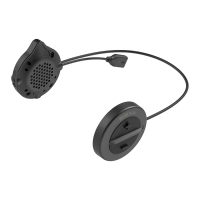
SPH10H-FM
28
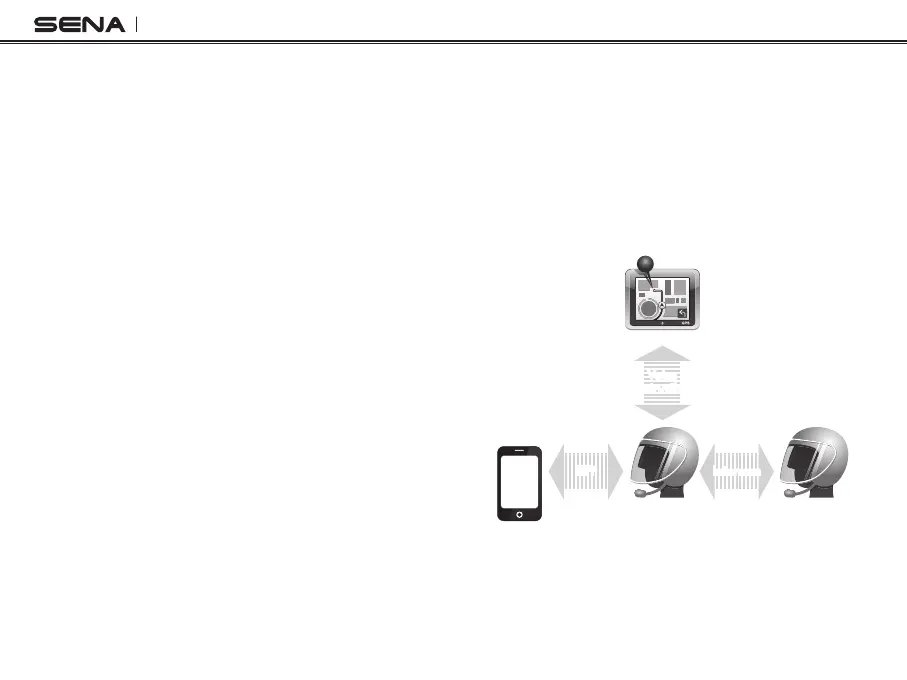
13.3 Intercom and GPS
If you pair a Bluetooth GPS to the SPH10H-FM as
described in 6.4 of this user's guide, you can hear
the turn-by-turn voice instruction of the GPS while
having an intercom conversation. The GPS voice
instruction interrupts intercom conversation, but it
is automatically reestablished after the GPS voice
instruction ends.
Intercom and GPS voice instruction
Smart Phone
SPH10H-FM
GPS
Intercom Friend
Voice
Instruction
Multipoint
Pairing
Intercom
Pairing
Mobile Phone
Pairing
IntercomHFP
13.2 Intercom and Mobile Phone Call
1. When you have an incoming mobile phone call
during an intercom conversation, you will hear a
ring tone. You can choose whether to 1) answer
the mobile phone call and stop the intercom
conversation, or 2) reject the phone call and stay
on the intercom conversation.
a. To answer the phone call and stop the intercom
conversation, tap the Jog Dial or the Phone
Button. When you hang up the phone call, the
intercom will automatically be recovered.
b. To reject the phone call and stay on the intercom
conversation, press the Jog Dial for 2 seconds
until you hear a beep.
Unlike other motorcycle Bluetooth headsets, this
prevents a user from being dropped out of an
intercom conversation by an incoming mobile call.
2. When you have an incoming intercom call during a
mobile phone call, you will hear 4 high tone beeps,
alerting you that there is an incoming intercom call.
You will also hear a voice prompt saying “Intercom
requested”. In this case, the intercom call does
not override the mobile phone call because
intercom has lower priority than mobile call. You
have to hang up the mobile phone call to make or
receive an intercom call.


 To Next Page