49
SPH10H
English
25.
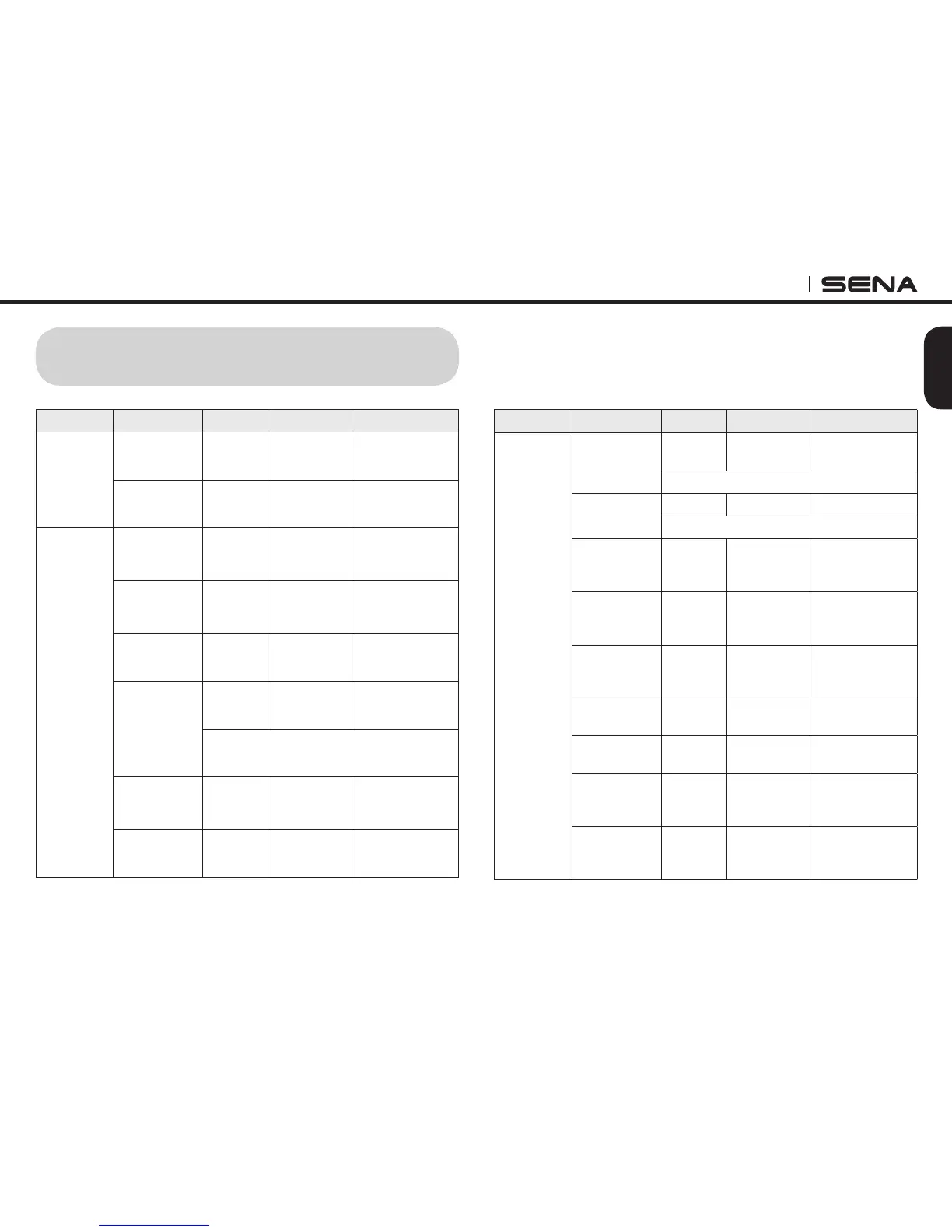
OPERATION QUICK REFERENCE
Button Description Duration LED Beep
Phone
Button
+ Jog Dial
Power-on 1 sec Solid blue
Ascending
beeps
Power-off Tapping Solid red
Descending
beeps
Phone
Button
Mobile phone
pairing
5 sec
Blue & red
alternatively
flashing
High tone
multiple beeps
MP3, GPS
pairing
5 sec
Blue & red
alternatively
flashing
High tone
multiple beeps
Call transfer 2 sec -
High tone single
beep
Factory reset
12 sec Solid red
High tone double
beeps
Jog Dial within 5 sec to confirm reset
Make &
answer phone
call
Tapping - -
Speed dial
Double
tapping
- -
Button Description Duration LED Beep
Jog Dial
Intercom
pairing
5 sec Red flashing
Double tone
beeps
Jog Dial of any one of the two headsets
Multipoint
pairing
5 sec Red flashing Multiple beeps
Phone Button within 2 sec
Universal
intercom
pairing
8 sec Blue flashing -
Start/end
intercom
conversation
Tapping - -
End
conference
intercom
1 sec Blue flashing
Mid-tone single
beep
Reject
incoming call
2 sec - -
Volume
adjustment
Rotating - -
Track forward/
back
Rotating
while
pressing
- -
Play/pause
Bluetooth
music
1 sec -
Mid-tone double
beeps



 To Next Page