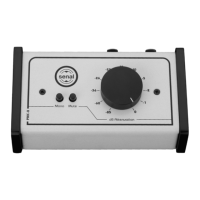
The Senal PMC-II is a professional passive monitor controller designed to provide precise and convenient volume control for powered monitors. It serves as an essential tool for anyone using powered monitors, offering an accurate and easy way to manage monitor volume without needing to access computer or sound card volume controls. Its passive design ensures that the audio signal remains unaltered and uncolored, preserving the original sound quality from your computer or other audio source.
Function Description:
The primary function of the PMC-II is to act as an intermediary volume control between an audio source (such as a computer, sound card, or audio interface) and a pair of powered monitors. By placing the PMC-II in the signal path, users can adjust the listening level with a dedicated, high-quality volume knob, offering a more tactile and precise control than typical software-based volume adjustments.
The device features multiple input options to accommodate a wide range of professional and consumer audio equipment. It includes two XLR/TRS combo inputs, which allow for connection via either XLR or 1/4" TRS cables, making it compatible with audio interfaces, sound cards, and other professional audio devices. Additionally, it provides a 1/8" (3.5 mm) TRS stereo mini input, enabling direct connection to consumer devices like computers, iPods, or any mobile device with a stereo mini output.
For outputs, the PMC-II offers two XLR outputs for connecting to powered monitors, ensuring a balanced and robust signal path. It also includes a 1/8" (3.5 mm) TRS stereo mini output, which can be used to connect to monitors with corresponding stereo mini inputs.
Beyond simple volume attenuation, the PMC-II incorporates two crucial monitoring features: a Mono button and a Mute button. The Mute button provides an instant way to silence the audio output, which is useful for quickly cutting sound without disturbing the volume setting. The Mono button allows users to collapse the stereo mix into mono, a critical function for checking mixes for balance, phase issues, and overall compatibility across different playback systems. This feature helps engineers and producers ensure their audio translates well to various mono-compatible devices.
The passive nature of the PMC-II is a significant advantage. Unlike active controllers that require power and can introduce noise or coloration to the audio signal through their internal circuitry, a passive controller uses only resistors to attenuate the signal. This design ensures signal integrity, delivering a clean and transparent sound directly to the monitors.
Usage Features:
The PMC-II is designed for straightforward integration into any audio setup. Before connecting, it is crucial to ensure that powered monitors are turned off to prevent loud noises or pops.
Connecting to a computer or other device with a 1/8" TRS stereo output involves using a 1/8" TRS Stereo Mini to 1/8" TRS Stereo Mini cable. This cable connects the audio output jack of the computer or device to the stereo mini input of the PMC-II. Once connected, the outputs of the PMC-II are then connected to the monitors. For monitors with XLR inputs, XLR cables are used, while monitors with 1/8" TRS stereo inputs can utilize the mini output jack with a 1/8" TRS stereo mini cable. To optimize the signal chain, the computer's sound output should be set to its maximum level, and the PMC-II's volume control knob should initially be set to full attenuation (all the way to the left). After turning on the monitors and starting audio playback, the volume can be gradually increased to the desired level using the PMC-II's knob.
For connecting to an audio interface, sound card, or other devices with XLR or 1/4" TRS outputs, the outputs of the interface or sound card are connected to the XLR/TRS combo inputs of the PMC-II. The PMC-II's XLR outputs are then connected to the monitors. Similar to the computer connection, the sound output of the computer (or the interface's output level) should be set to its maximum, and the PMC-II's volume should be brought up gradually from full attenuation.
The Mono button is activated by pressing it, which sums the stereo signal to mono for critical listening. Depressing the button returns the monitoring to stereo. The Mute button works similarly: pressing it silences the output, and depressing it restores the sound. These physical buttons provide immediate control, enhancing workflow efficiency.
The robust steel housing and wood panels not only give the PMC-II a stylish appearance but also contribute to its durability, making it suitable for various studio environments, from professional setups to home project studios. Its compact size allows it to fit easily into any workstation.
Maintenance Features:
The PMC-II is a low-maintenance device due to its passive design, which means it does not contain complex electronic components that typically require servicing.
Key maintenance guidelines include:
- Cleaning: The unit should be cleaned with a soft, dry cloth. Avoid using harsh chemicals or abrasive materials that could damage the finish or controls.
- Environmental Protection: It is important to keep the unit away from water and any flammable gases or liquids to prevent damage and ensure safe operation.
- Handling: Users are advised not to attempt to disassemble or repair the equipment. Doing so will void the warranty and could lead to damage to the device. Senal will not be responsible for any damage resulting from unauthorized disassembly or repair.
- Illustrative Images: All images in the manual are for illustrative purposes, meaning the actual product may have minor cosmetic variations, but the functionality and core design remain consistent.
The PMC-II's design prioritizes reliability and longevity, making it a dependable control surface for various audio applications. Its passive nature eliminates the need for external power, further simplifying its setup and reducing potential points of failure. The sturdy construction ensures it can withstand the rigors of daily studio use.


 To Next Page
 General