EN - 7
PUTTING INTO OPERATION
Before first use, be sure to read the safety instructions contained in this user's
manual carefully.
Before first use, please charge the BT speaker to a maximum level. Press and hold the
“On/Off” button to turn on the BT speaker. Turning on/off is indicated by a sound signal.
To turn the BT speaker off, press and hold the “On/Off” button. Changing the source of
the music being played is done by briefly pressing the button “M” when the power is on.
Caution: After a longer period of inactivity, the appliance will turns itself off.
POSITION A - BT SPEAKER TRANSPORT
The speaker offers a vertical position of placement on a flat surface. The main figure
shows the underside of the BT speaker “Z - BT speaker feet”.
Caution: Always position the device so that it does not endanger the health of
persons in the vicinity or cause damage to property.
PAIRING DEVICES VIA BLUETOOTH
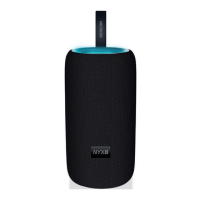
Turn on the BT speaker and search for its Bluetooth name “NYX 2” in the device
to be paired, then start the pairing process. If you are requested to enter a pairing
code while your device and the BT speaker are pairing, use the code: “0000”. To
disconnect a paired device, end the pairing session on your mobile device or press
the “On/Off” 3 times. Disconnection will be confirmed by an acoustic signal.
Note: To ensure a stable Bluetooth connection, maintain a distance of up to 10
metres between the BT speaker and the connected device.


 To Next Page