EN - 9
PLAY/PAUSE BUTTON
● Press the “On/Off” button to start or pause music playback during Bluetooth
connection or while a memory media is inserted.
● The incoming call to a Bluetooth connected paired device will be announced by an
acoustic signal which will interrupt the music being played back. To answer/hang
up an incoming call, press the “On/Off” button briefly. To reject the incoming call,
long-press the “On/Off” button.
Note: Microphone reception in the BT speaker may be attenuated due to the
waterproof nature of the device. To improve reception, turn the BT speaker
microphone (“7”) towards you and speak loudly near the BT speaker.
VOLUME AND TRACK PLAYBACK CONTROL
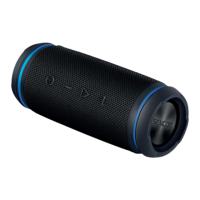
To control the BT speaker’s volume (+/- buttons), use the buttons on the BT speaker.
During music playback, you can press and hold the “+” button to jump to the next track
playback. To select the previous track, press and hold the “-” button.
LIGHT EFFECTS
The BT loudspeaker is equipped with light effects in the area of passive light emitter.
To switch the lighting effects off/on or change them, press the “M” button twice.


 To Next Page