- 5 -
10/2023
2023, .
• If you switch the cooler to cooling and humidifying mode at ahigh
speed setting, this speed is maintained even after switching to the
mode.
• Turn off the cooling andhumidifying mode by pressing the
button.
The indicator light
goes out and the pump goes off.
Warning:
If the air cooler detects alack of water in the tank or
you remove the water tank or the tank is not inserted,
after ashort while the cooling and humidifying mode
will automatically switch off to avoid damaging the
pump and an audible warning will sound (5 short
beeps).
Note:
To increase the cooling efficiency, you can put the supplied
cooling boxes in the water and let them cool in the freezer
beforehand. Place the cooling boxes in the left side of
the tank. Otherwise, the part of the water pump that is
immersed in the water could be damaged.
Setting the Operating Mode
• Press the
button repeatedly to select the operating mode in the
following order: normal mode – natural breeze mode (
) – sleep
mode (
).
• For natural breeze and sleep modes, the corresponding indicator
light will illuminate; for normal mode, no operating mode light will
illuminate.
Normal Operating Mode
• Inthis mode, the fan speed is set by the user and the fan speed is
constant.
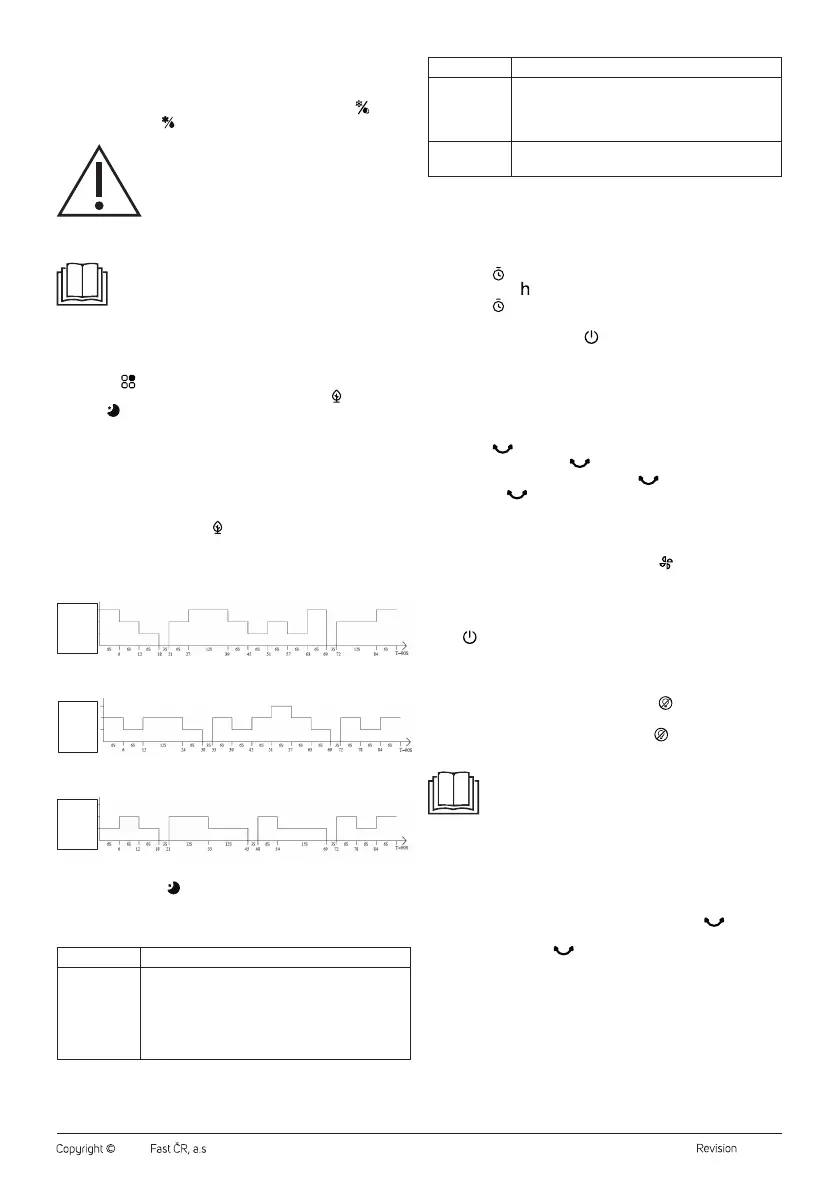
Natural Breeze Operating Mode
• In natural breeze mode, the airflow speed is controlled automatically
from high to low speed depending on the selected fan speed. This
achieves anatural breeze effect.
• Mode progression at high fan speed setting:
High speed
Medium speed
Low speed
Stopping the fan
• Mode progression at medium fan speed setting:
High speed
Medium speed
Low speed
Stopping the fan
• Mode progression at low fan speed setting:
High speed
Medium speed
Low speed
Stopping the fan
Sleep Operating Mode
Depending on the fan speed set by the user and the preset rules of this
mode, the speed is regularly reduced, which reduces the uncomfortable
feeling caused by the strong flow and increases comfort during sleep.
Fan settings Sleep mode progression
High speed
The air cooler will run for 30minutes innormal mode
at high fan speed. After 30minutes the high fan
speed switches to the medium speed. After another
30minutes the fan speed will be reduced to the low
speed. The air cooler will remain running at alow fan
speed.
Fan settings Sleep mode progression
Medium speed
The cooler will run for 30minutes innormal mode
when the medium fan speed is set. After 30minutes
of the medium fan speed goes to the low speed. The
air cooler will remain running at alow fan speed.
Low speed
The appliance will be innormal mode when the fan is
set to low speed.
In sleep mode, the fan speed on the numeric display changes as the fan
speed switches.
Timer Setting
• Set the amount of time that the air cooler will run, after which it will
switch off and go into standby mode.
• Press the
button to switch on the timer. “0” flashes on the numeric
display and the indicator light comes on.
• Press the button repeatedly to set the timer time from 0 to 9 hours.
The numeric display will show the timer value.
• Press any button (except the
button) or wait about 5 seconds and
the timer time will be stored in memory. The countdown will start and
the numeric display will alternate between the timer time and the set
fan speed.
• After the timer period has elapsed, the air cooler switches off and
enters standby mode.
Front Grille Rotation
• Press the
button andthe front protective grille will start to rotate
slowly. The indicator light comes on.
• To stop the front grille rotating, press the
button, the rotation will
stop and the
indicator light will go out.
Drying Function
• The drying function is used to dry the cooling insert e.g. before storing
the air cooler for alonger period of time.
• While the air cooler is on, press and hold the
button for 3 seconds
to activate the drying function. The fan speed will automatically
change to high speed and the function will run for 20minutes. The air
cooler then automatically switches off and enters standby mode.
• It is not possible to change the air cooler settings during this time. Only
the
button will be functional. If you switch the air cooler off during
the drying period and then switch it on, the appliance will start the
drying function from the beginning.
Turning the Display Backlight On/Off
• While the air cooler is inoperation, press the
button to turn off the
display backlight.
• If you need to turn the display on, press the button or any other
button (the setting will not be switched).
Note:
Any button will dim its brightness (to 33% of its original
brightness) after 1 minute of pressing it. If you press it again,
it will light up again to its original brightness.
Automatic Shut-off Function
• The appliance is equipped with an automatic shut-off function after
15 hours of continuous operation. This means that after 15 hours of
operation, when none of the control buttons are pressed, the appliance
will turn off automatically.
• If you need to turn this function off, press andhold the
button for
3seconds, three short beeps will sound. To turn this function back
on, press andhold the button for 3seconds. Three short beeps
will sound.
. . . . . . . . . . . . . . . . . . . . . . . . . . . . . . . . . . . . . . . . . . . . . . . . . . . . . . . . . . . . . . . . . . . .
REMOTE CONTROL
• The functions of the buttons on the remote control and the control
panel are identical. If you wish to use the remote control, point it at
the signal receiver at thefront of the cooler under the display. The
maximum range of the signal sent from the remote control is 6 m.


 To Next Page
 Loading...