EN - 12
13. Storage
1. Clean the paper shredder (see chapter „Cleaning and maintenance“).
2. Store the paper shredder in a clean and dry location. Never disassemble the paper shredder for
storage.
3. Keep the paper shredder away from children.
14. Troubleshooting
WARNING!
Risk of electric shock!
Repairing the paper shredder yourself or using unsuitable parts for repair may increase the risk of
electric shock.
- Do not open the housing of the paper shredder; instead, have qualified professionals perform
any repairs. Contact a qualified workshop for this. Liability and warranty claims are waived in the
event of repairs performed by the user or incorrect operation.
Some problems may be caused by minor faults that you can fix yourself. To do so, follow the
instructions in the following table. If it is still not possible to resolve the problem, contact customer
service. Do not repair the paper shredder yourself.
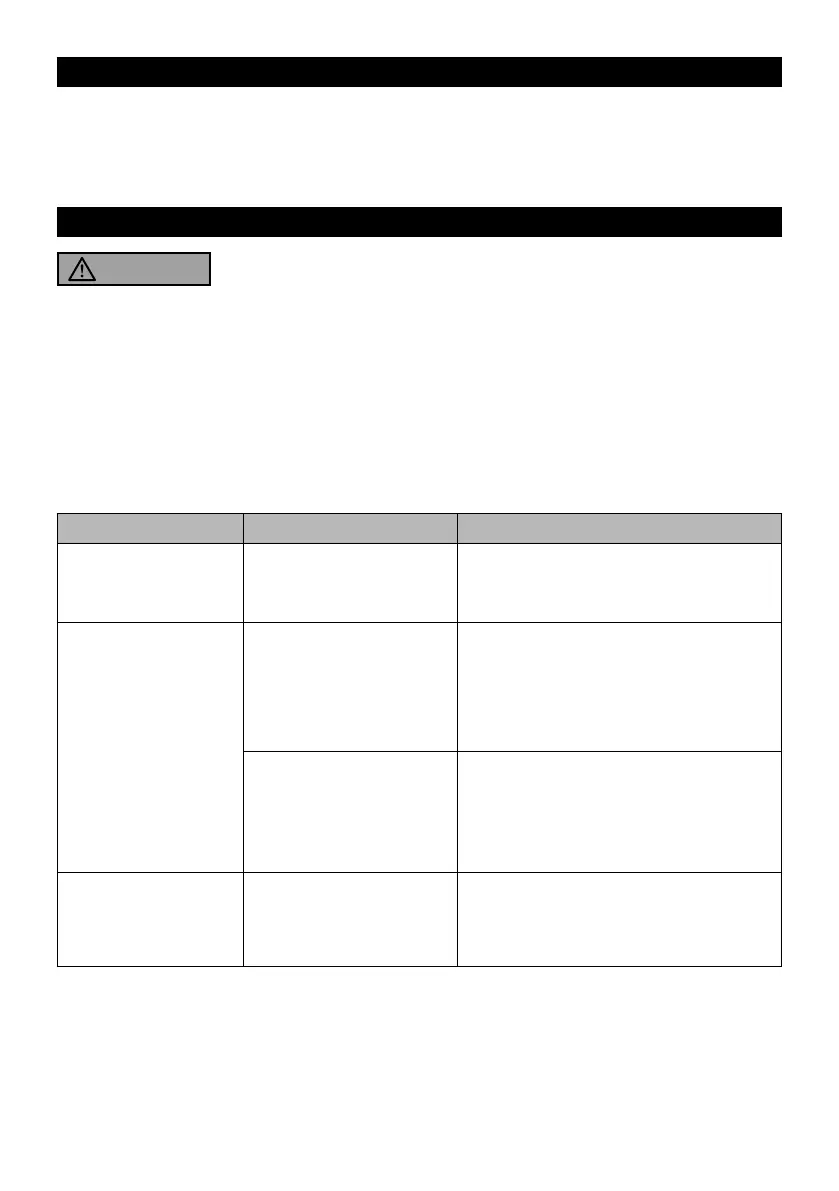
Problem Cause Solution
The paper shredder
switches off during
operation.
The paper shredder is
overloaded.
Switch the paper shredder off and unplug
the power cord. Let it cool down to room
temperature before putting it back to use.
The paper shredder
does not start when
feeding in paper.
The paper may have been
inserted at an oblique
angle; the detection sensor
is thus not activated.
Correctly insert the paper into the feed slot.
The paper is too thin, too
soft or too creased to reli-
ably activate the detection
sensor.
1. Set the slide switch to
REV
position and
pull the paper out of the feed slot.
2. Fold the paper and feed it again.
A paper jam occurs. Too many sheets may
have been fed in the paper
shredder at a time.
Set the slide switch to the REV position to
clear the jam.



 To Next Page