When the 1st alarm occurs, and the operator recognizes it and presses Power key, only the alarm
sound stops, remaining LED alarm as the operation stale.
When the 2nd alarm happens, the operator and workers should promptly escape from the work
site. The alarm will stop, when power key is pressed at the place where the concentration value of
gas is normal (Alarm alerts continuously even if the Power key pressed, when it does not return to
the normal status.)
When STEL / TWA alarm occurs, it is indicated with the value of the measured concentration
and alerts alarms of the same sound of alarm and vibration as that of the 2nd alarm.
When STEL / TWA alarm occurs, the icon can be deleted only by Power Off.
Primary battery alarm sounds repeatedly at 5 minute intervals when only a bar of battery icon is
remained.
Secondary battery alarm starts right before the end of power, and the power source finishes after
10 seconds from the outbreak of alarm.
In the event of failure of test or calibration, the icon is displayed with the sound of alarm.
Gas O
2
CO H
2
S H
2
SO
2
1
st
19% 30 ppm 10 ppm 100 ppm 2 ppm
2
nd
23% 60 ppm 20 ppm 500 ppm 4 ppm
TWA N/A 30 ppm 10 ppm N/A 2 ppm
STEL N/A 200 ppm 15 ppm N/A 5 ppm
Alarm Set Point
Alarm Set
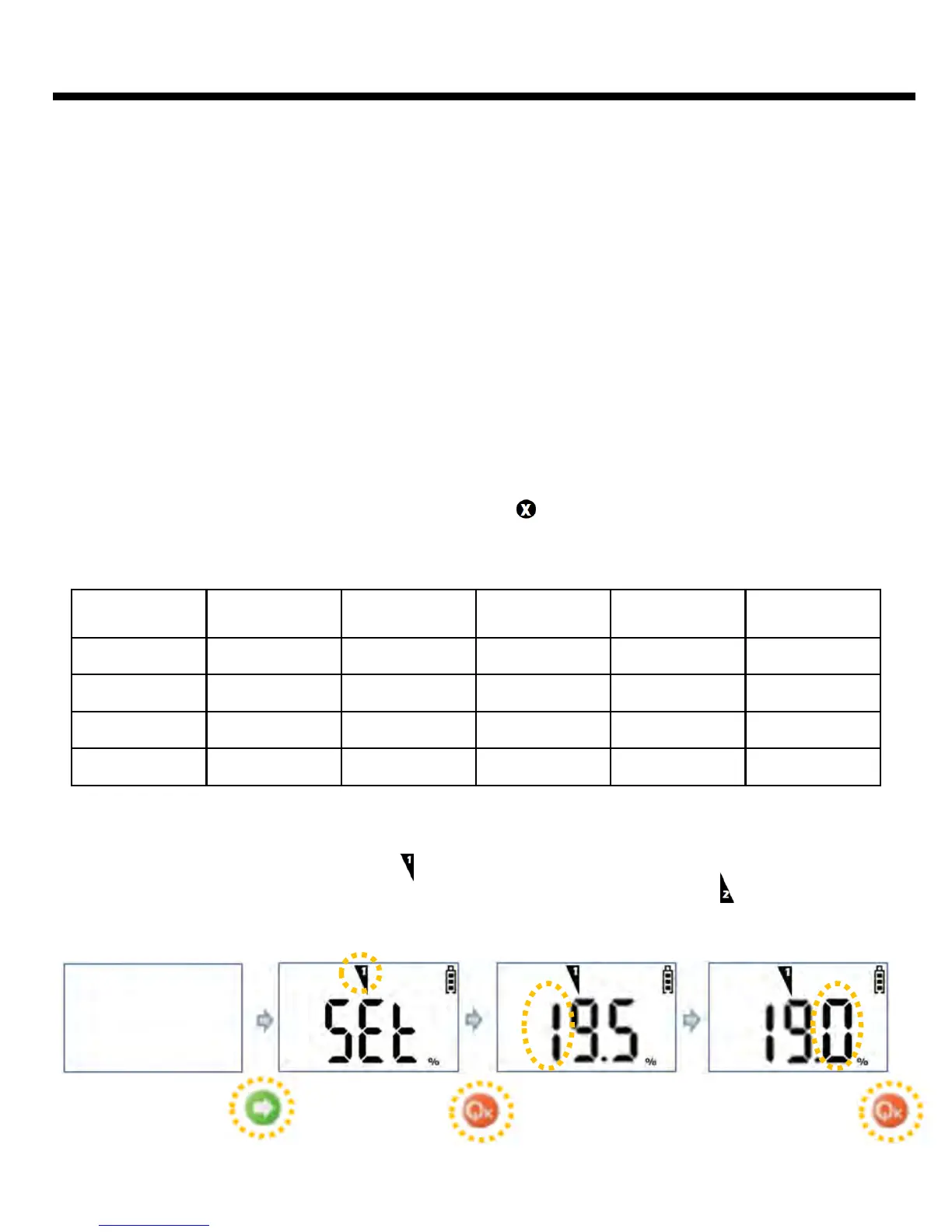
When Arrow key is pressed for 3 seconds at the state of power off, program enters to 1st
Alarm Set Mode with blinking of icon . It approaches to 1st Alarm Change Mode by
pressing Power key, and moves to 2nd Alarm Set Mode with blinking icon by pressing Arrow
key. If you want to return it to Gas Measure Mode without changing Alarm Set Value, it can
move by Arrow key.
Hold 3 secs
10



 To Next Page