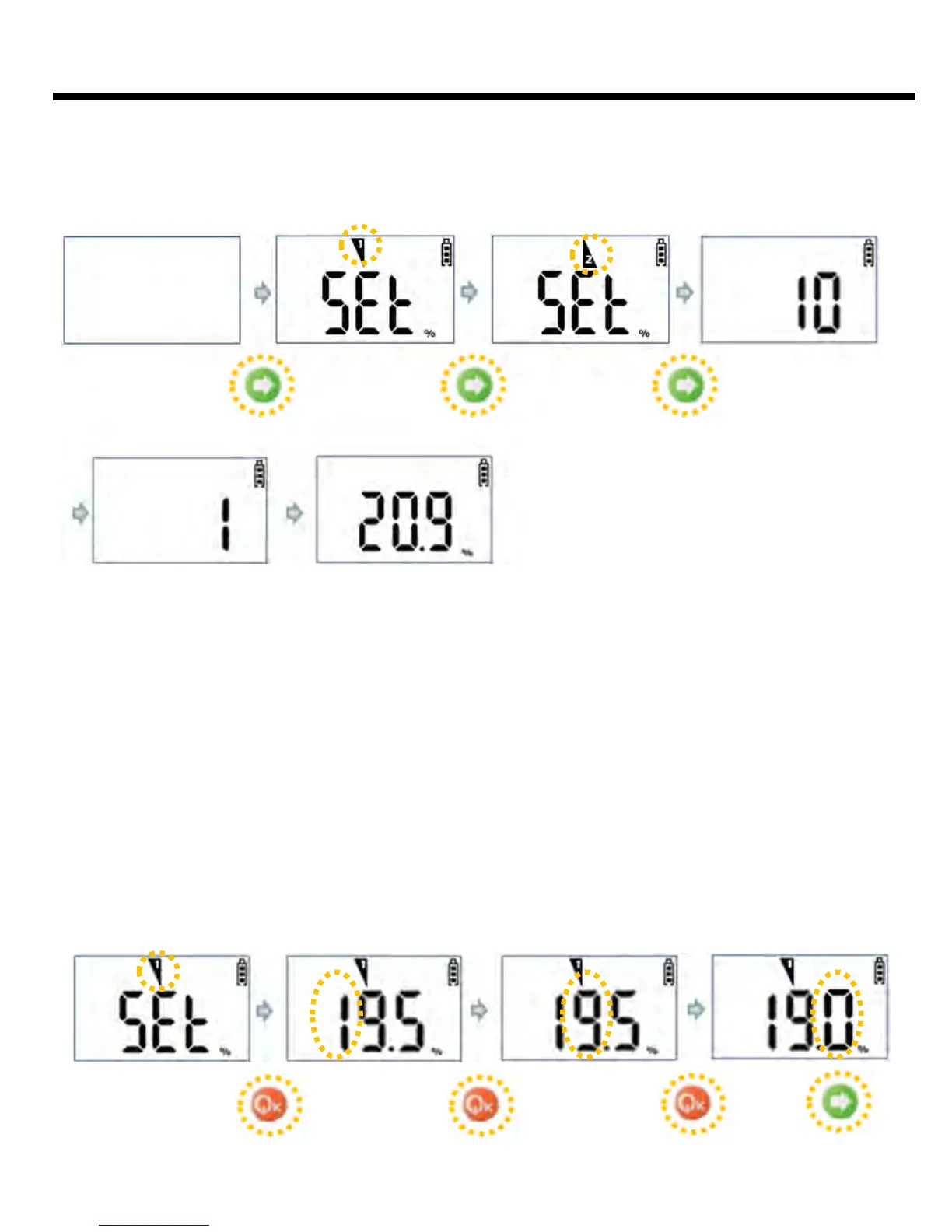
Program returns to 1st Alarm Set Mode that is the initial Alarm Set Mode, after setting up 1st
Alarm value. It can approach to 2nd Alarm Set Mode or return to Gas Measure Mode. The way
of setting 2nd Alarm is same as the method of setting 1st Alarm.
Hold 3 secs
10 secs count down
When the program returns to Gas Measure Mode after 2nd Alarm Set Mode, 10 seconds
countdown proceeds with alarm sound. It will be changed to Gas Measure Mode with alarm
sound and vibration, when the countdown finishes.
When Arrow key is pressed after entering to Alarm Value Set Mode, the first digit number will
move upward by each 1 step. And blinking 2nd number moves the position by pressing Power
key. If you press Arrow key, the number moves upward, and the 3rd number blinks and moves
the position by pressing Power key. It returns to Alarm Value Set Mode with alarm sound,
when Power key is pressed after changing the last digit is completed.
Method of Alarm Value Input
Example) To change 1st Alarm Value from 19.5% to 19.0%
11



 To Next Page