Using the headphones
ACCENTUM PLUS | 13
Using the headphones
Information on the rechargeable battery
and the charging process
The headphones have a built-in rechargeable battery. A complete
charging cycle takes approx. 3 hours. The charging time can vary
depending on the power source used and the ambient temperature.
Before using the headphones for the first time, charge the recharge-
able battery for a complete charging cycle without interruption.
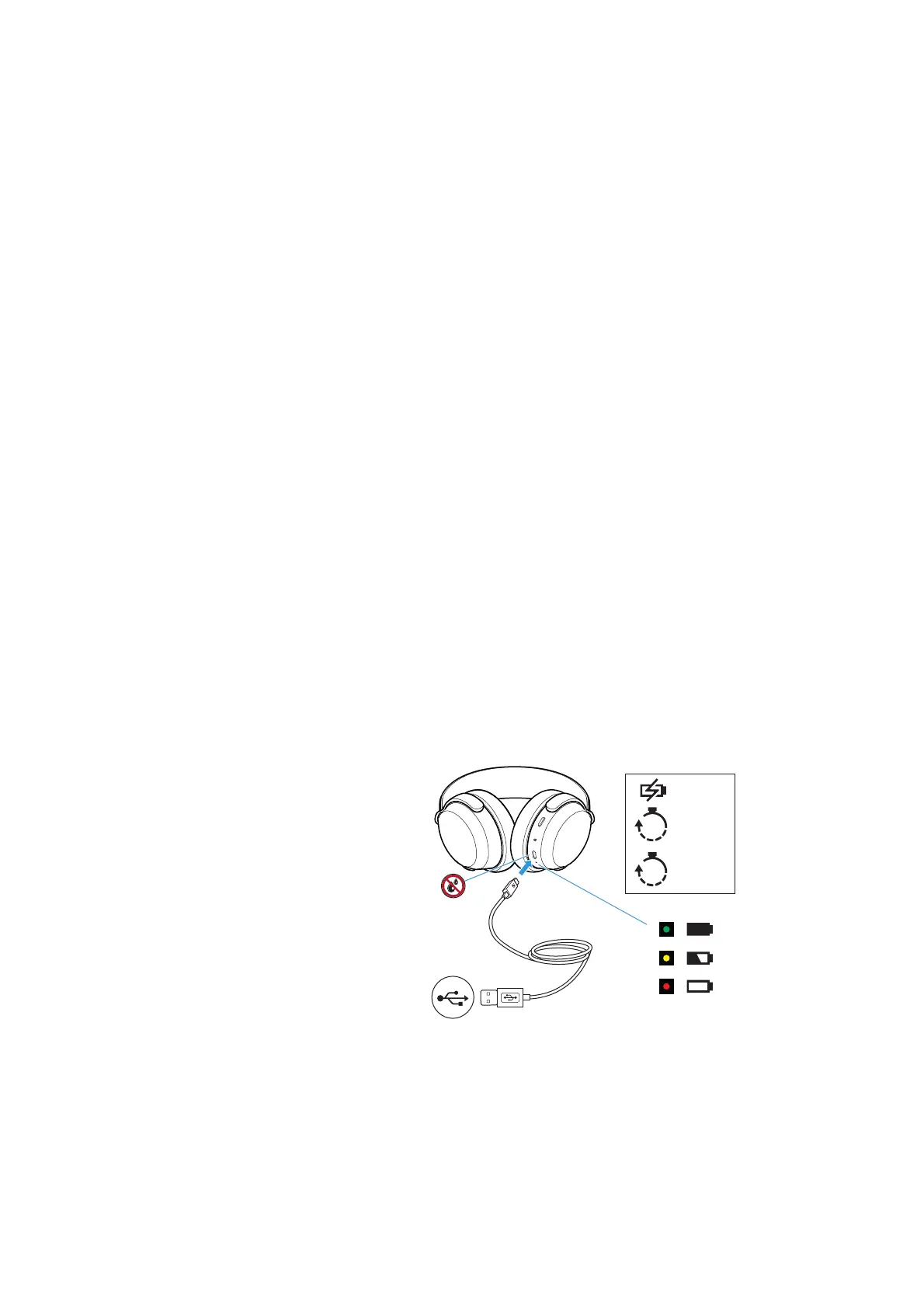
When the headphones are being charged, the LED display lights up
(> 9). Once the battery charge of the headphones is 90 % to 100 %,
the LED lights up green. When the battery charge drops to a low
level, the voice prompt “Recharge headset” asks you to recharge the
headphones. If the headphones are not charged, the voice prompt
will be repeated every 10 minutes until the headphones switch off.
Sonova Consumer Hearing recommends using the supplied USB
cable and a compatible standard USB power supply for charging the
headphones.
While the headphones are being charged, you can still listen to
music or make phone calls. In this case, however, the charging time
may be longer.
At the end of its operational lifetime, this product with its built-in
rechargeable battery must be disposed of separately from normal
household waste. You can find more information here: > 41.
Charging the headphones’ rechargeable
battery
1. Make sure that the charging socket is free from moisture and con-
tamination. Connect the USB-C connector of the charging cable
to the USB socket of the headphones.
2. Connect the USB-A connector to a corresponding socket of a USB
power source (to be ordered separately). Make sure that the USB
power source is connected to the power supply system.
The charging process of the headphones begins. The LED display
indicates the charge status.
R
USB-C
USB-A
10
min
3
hrs
up to 7 hrs
up to 50 hrs











 To Next Page