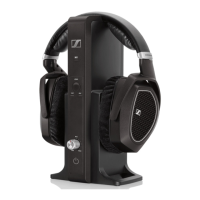
The Sennheiser RS 120-W is a wireless TV headphone system designed for private domestic use, offering an immersive audio experience for TV sets, hi-fi systems, and home cinema setups. The system comprises HDR 120-W headphones and a TR 120-W transmitter, which utilizes Bluetooth LE Audio wireless technology to transmit audio. This technology allows for a stable connection and the ability to connect any number of compatible HDR 120-W headphones to a single transmitter simultaneously, limited only by the wireless range.
Function Description:
The core function of the RS 120-W system is to transmit audio wirelessly from an audio source to the headphones. The TR 120-W transmitter connects to various audio sources, including those with analog RCA outputs, 3.5 mm headphone jacks, or digital optical outputs (with an optional analog-to-digital converter). Once connected and powered on, the transmitter broadcasts the audio signal. The HDR 120-W headphones receive this signal, allowing users to listen to their TV or other audio sources without disturbing others. The system is designed for ease of use, with features like automatic power-off and charging when the headphones are placed on the transmitter's holder.
Usage Features:
- Wireless Audio Transmission: The system provides wireless freedom, allowing users to move within the transmission range of up to 60 meters (with a free line of sight) without losing audio quality. If the headphones leave the transmission range, the sound quality will deteriorate, and the connection will break. However, if the headphones re-enter the range within 3 minutes, the connection is automatically re-established.
- Multiple Audio Source Connectivity: The transmitter offers versatile connectivity options. It can be connected to audio sources via stereo RCA audio cables for analog RCA sockets, or with an adapter for 3.5 mm headphone jacks. For digital audio outputs, an optional analog-to-digital converter can be used.
- Easy Setup and Pairing: The headphones and transmitter are factory pre-paired, simplifying the initial setup. For additional HDR 120-W headphones, pairing is a straightforward process involving switching on both the transmitter and headphones and placing the headphones near the transmitter.
- Rechargeable Batteries: The HDR 120-W headphones are powered by two 1.2 V (AAA) NiMH rechargeable batteries. These batteries can be charged by simply placing the headphones on the transmitter's headphone holder. A complete charging cycle takes up to 18 hours, but an initial charge of at least 24 hours is recommended for optimal battery performance. The CHARGE LED on the transmitter indicates the charging status.
- Volume Control: The headphones feature a VOLUME control on the right ear cup, allowing users to adjust the listening level to their comfort. To protect hearing, the volume is slightly reduced at the beginning of audio transmission and gradually levels out over the first 1-2 minutes.
- Sound Modes: The transmitter offers three distinct sound modes to optimize the audio experience for different content:
- NEUTRAL mode: Reproduces the sound unchanged, ideal for general listening.
- MUSIC mode: Boosts the bass for a dynamic sound, suitable for music playback.
- SPEECH mode: Boosts the frequency range for speech, enhancing intelligibility for dialogs in movies or TV series.
- Headband Adjustment: The headphones feature an adjustable headband with a snap-in locking mechanism, ensuring a comfortable and secure fit for various head sizes. Users can adjust the headband length to ensure the ear pads comfortably cover their ears with even, gentle pressure.
- Automatic On/Off and Standby: The headphones automatically switch off when placed on the transmitter's holder, initiating the charging process. If the audio source is switched off for 5 minutes, both the transmitter and headphones enter standby mode. The headphones can be woken up by switching them off and on again.
- LED Indicators and Sound Signals: The transmitter has ON/OFF and CHARGE LEDs to indicate its status (standby, on, audio signal present, charging). The headphones provide sound signals for important events, such as switching on/off, searching for the audio signal, and indicating low battery levels (3 descending sound signals).
Maintenance Features:
- Cleaning: The headphones and transmitter should be cleaned only with a soft, dry cloth. It is important to keep all liquids away from the product and avoid using solvents or cleansing agents to prevent short circuits and damage to the electronics. The contacts on both the headphones and the transmitter should be cleaned periodically with a cotton swab.
- Battery Management: For extended periods of non-use, the rechargeable batteries should be removed from the headphones to conserve power. It is crucial to only charge rechargeable batteries and never standard batteries, as non-rechargeable batteries can leak and damage the headphones during charging. Rechargeable batteries should be charged regularly (about every 3 months) even when not in use. Defective rechargeable batteries should be disposed of immediately and removed from the product.
- Ear Pad Replacement: For hygiene reasons, the ear pads should be replaced periodically. Replacement ear pads are available from Sonova Consumer Hearing partners. The process involves lightly twisting the ear pads counterclockwise to remove them and then twisting new ear pads clockwise until they click into place, ensuring correct left (L) and right (R) orientation.
- Proper Storage: The product should be stored in a clean, dust-free environment and kept dry. It should not be exposed to extreme temperatures or direct sunlight for long periods to prevent heat accumulation, corrosion, or deformation.
- Transmitter Mounting: The transmitter can be hung on a wall using suitable mounting material. When wall-mounting, it is important to ensure the transmitter is not mounted higher than 2 meters to prevent injury in case it falls.
- Power Supply Unit Care: The power supply unit should always be easily accessible, properly plugged into the wall socket, and operated within the permissible temperature range. It should be unplugged from the wall socket during lightning storms or when the product is not in use for extended periods.

 Need help?
 General









 To Next Page